> ## Documentation Index
> Fetch the complete documentation index at: https://infisical.com/docs/llms.txt
> Use this file to discover all available pages before exploring further.
# Access control
> Understand how permissions work in an Agent Vault project.
Access control in Agent Vault happens at two levels, inside each [Agent Vault project](https://infisical.com/docs/documentation/platform/agent-vault/projects.md):
1. **Product membership:** being added to the project
2. **Access bundle grants:** being granted an [access bundle](https://infisical.com/docs/documentation/platform/agent-vault/access-bundles.md), which lets you create sessions with it
Users, groups, and [machine identities](https://infisical.com/docs/documentation/platform/identities/machine-identities.md) go through both levels and use the same roles, so this page applies to all three unless it says otherwise.
> [!NOTE]
>
> Access control doesn't directly apply to the actual agents you run through Agent Vault:
>
> * A user or machine identity uses their access to create a [session](https://infisical.com/docs/documentation/platform/agent-vault/sessions) with an associated access bundle
> * Agents can only make requests that are allowed by their session's access bundle
>
> This keeps the user or machine identity directly accountable for what an agent can access.
## Product membership
Each Agent Vault project has its own member list, and membership in one project gives no access to another. Each member of a project has one of two roles:
| Role | What they can do |
| - | - |
| **Admin** | - Create and manage access bundles, services, variables, skills, and proxies
- Grant access bundles
- Manage membership
- Let machine identities [create sessions on behalf of users](https://infisical.com/docs/documentation/platform/agent-vault/sessions-on-behalf-of-users.md)
- Send [inline services](https://infisical.com/docs/documentation/platform/agent-vault/inline-services.md) with a session
- Read audit logs
|
| **Member** | - Create sessions with the access bundles granted to them
- Revoke their own sessions
- Set up their [personal values](https://infisical.com/docs/documentation/platform/agent-vault/access-bundles.md#set-up-your-personal-values) and keep [personal variables](https://infisical.com/docs/documentation/platform/agent-vault/variables.md#personal-variables)
- View the latest version of the skills in the access bundles granted to them
|
An admin can use every access bundle without a grant. A member can't use an access bundle until an admin grants it, and only sees the bundles granted to them. On the **Sessions** page, members see their own sessions, and admins can switch between **All Sessions** and **My Sessions**.
If you're an organization admin, you can add yourself to any project with the **Admin** role by selecting **Join as Admin** (see [Join as an organization admin](https://infisical.com/docs/documentation/platform/agent-vault/projects.md#join-as-an-organization-admin)). You don't need another admin to add you.
### Adding members
> [!NOTE]
>
> You need the **Admin** role in the project to add members.
**Step 1**
In your Agent Vault project, go to **Access Control**.
**Step 2**
Select the **Users**, **Machine Identities**, or **Groups** tab.
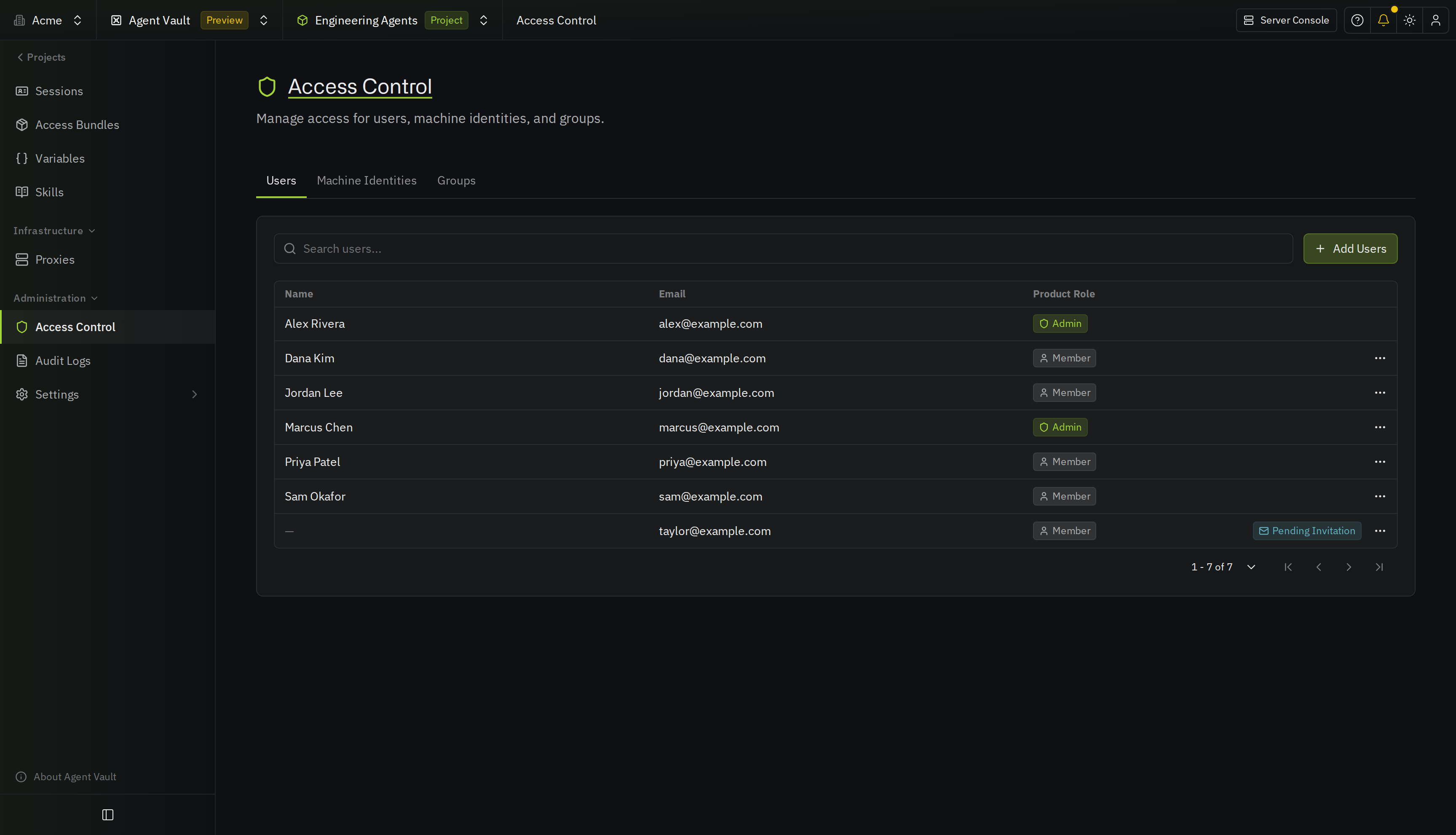
**Step 3**
Select **Add Users**, **Add Machine Identity**, or **Add Group**.
**Step 4**
Select who to add, and choose **Admin** or **Member** in **Product Role**.
You can only add users who are already in the [organization](https://infisical.com/docs/documentation/platform/organization.md), including users whose invite is still pending. If a user's invite is pending, they can't create sessions until they accept it.
> [!NOTE]
>
> You can't change your own role or remove your own access. Ask an admin if you need to do either.
## Access bundle grants
Adding someone to a project doesn't automatically give their agents access to any external APIs. They also need a grant on an [access bundle](https://infisical.com/docs/documentation/platform/agent-vault/access-bundles.md), which defines the external APIs their agents can access during a [session](https://infisical.com/docs/documentation/platform/agent-vault/sessions).
> [!NOTE]
>
> You need the **Admin** role in the project to grant access bundles.
Open an access bundle and select **Manage Access** to [grant it](https://infisical.com/docs/documentation/platform/agent-vault/access-bundles.md#grant-access) to a user, machine identity, or group.
### Groups
If you grant an access bundle to a group, every member of that group gets access to it, and each member can independently create sessions.
> [!NOTE]
>
> If someone joins the group, they inherit access to the bundle. If they leave the group, or someone deletes the group, they lose access to the bundle. Infisical also deletes their [personal values](https://infisical.com/docs/documentation/platform/agent-vault/access-bundles.md#set-up-your-personal-values) for the bundle, unless they can still use it another way, such as through a direct grant, another group, or the **Admin** role.
## When access changes
If someone's project membership or access bundle grants change while their agent is running, the proxy applies the change to the agent's requests within one [poll interval](https://infisical.com/docs/documentation/platform/agent-vault/proxies.md#poll-interval) (60 seconds by default). They don't need to restart the agent.
If someone is removed from a project or leaves it, Infisical also removes their access bundle grants and their personal values in that project. If they get added back, they'll need to be re-granted the same access bundles again before their sessions get credentials.
> [!TIP]
>
> For more information about what happens when access changes mid-run, check out [access changes](https://infisical.com/docs/documentation/platform/agent-vault/sessions#access-changes).
This documentation is built and hosted on [Mintlify](https://mintlify.com), a developer documentation platform.