> ## Documentation Index
> Fetch the complete documentation index at: https://infisical.com/docs/llms.txt
> Use this file to discover all available pages before exploring further.
# Machine identities
> Learn how to set metadata and leverage authentication attributes for machine identities.
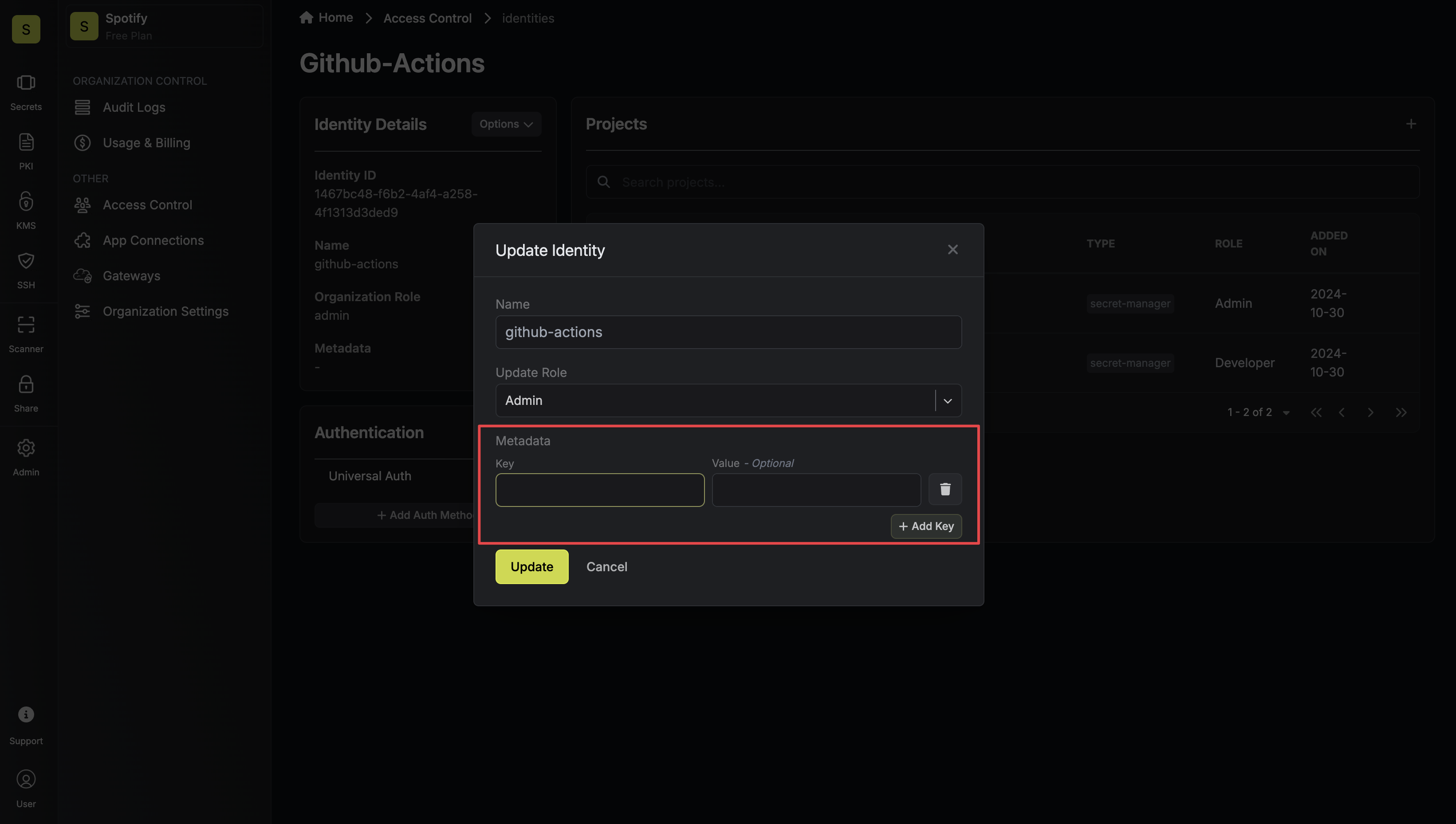
Machine identities can have metadata set manually, just like users. In addition, during the machine authentication process (e.g., via OIDC), extra attributes called claims—are provided, which can be used in your ABAC policies.
#### Setting Metadata on Machine Identities


 #### Accessing Attributes From Machine Identity Login
When machine identities authenticate, they may receive additional payloads/attributes from the service provider.
For methods like OIDC, these come as claims in the token and can be made available in your policies.
1. Navigate to the Identity Authentication settings and select the OIDC Auth Method.
2. In the **Advanced section**, locate the Claim Mapping configuration.
3. Map the OIDC claims to permission attributes by specifying:
* **Attribute Name:** The identifier to be used in your policies (e.g., department).
* **Claim Path:** The dot notation path to the claim in the OIDC token (e.g., user.department).
For example, if your OIDC provider returns:
```json theme={"dark"}
{
"sub": "machine456",
"name": "Service A",
"user": {
"department": "engineering",
"role": "service"
}
}
```
You might map:
* **department:** to `user.department`
* **role:** to `user.role`
Once configured, these attributes become available in your policies using the following format:
```
{{ identity.auth.oidc.claims. }}
```
#### Accessing Attributes From Machine Identity Login
When machine identities authenticate, they may receive additional payloads/attributes from the service provider.
For methods like OIDC, these come as claims in the token and can be made available in your policies.
1. Navigate to the Identity Authentication settings and select the OIDC Auth Method.
2. In the **Advanced section**, locate the Claim Mapping configuration.
3. Map the OIDC claims to permission attributes by specifying:
* **Attribute Name:** The identifier to be used in your policies (e.g., department).
* **Claim Path:** The dot notation path to the claim in the OIDC token (e.g., user.department).
For example, if your OIDC provider returns:
```json theme={"dark"}
{
"sub": "machine456",
"name": "Service A",
"user": {
"department": "engineering",
"role": "service"
}
}
```
You might map:
* **department:** to `user.department`
* **role:** to `user.role`
Once configured, these attributes become available in your policies using the following format:
```
{{ identity.auth.oidc.claims. }}
```
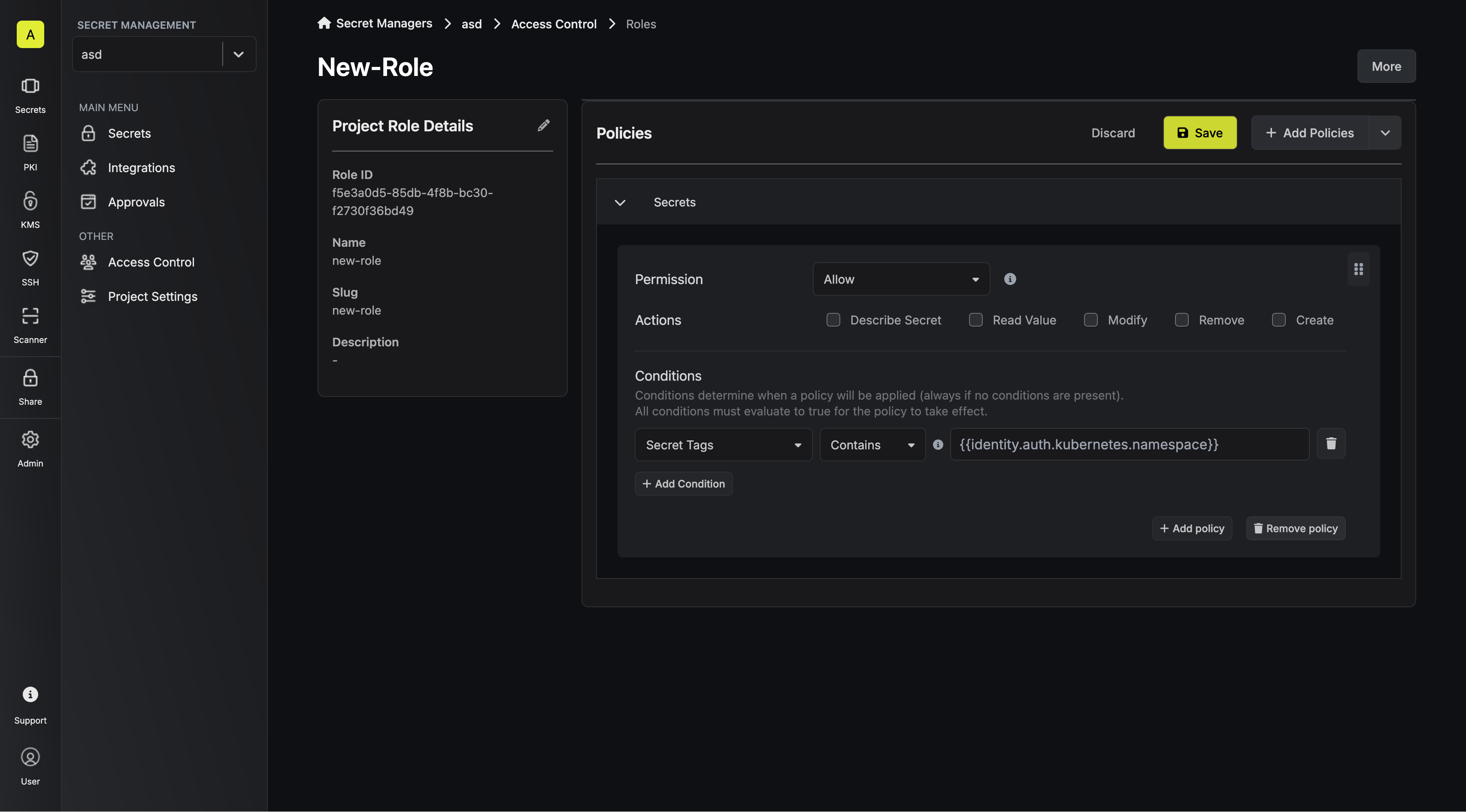
 For identities authenticated using Kubernetes, the service account's namespace and name are available in their policy and can be accessed as follows:
```
{{ identity.auth.kubernetes.namespace }}
{{ identity.auth.kubernetes.name }}
```
For identities authenticated using Kubernetes, the service account's namespace and name are available in their policy and can be accessed as follows:
```
{{ identity.auth.kubernetes.namespace }}
{{ identity.auth.kubernetes.name }}
```
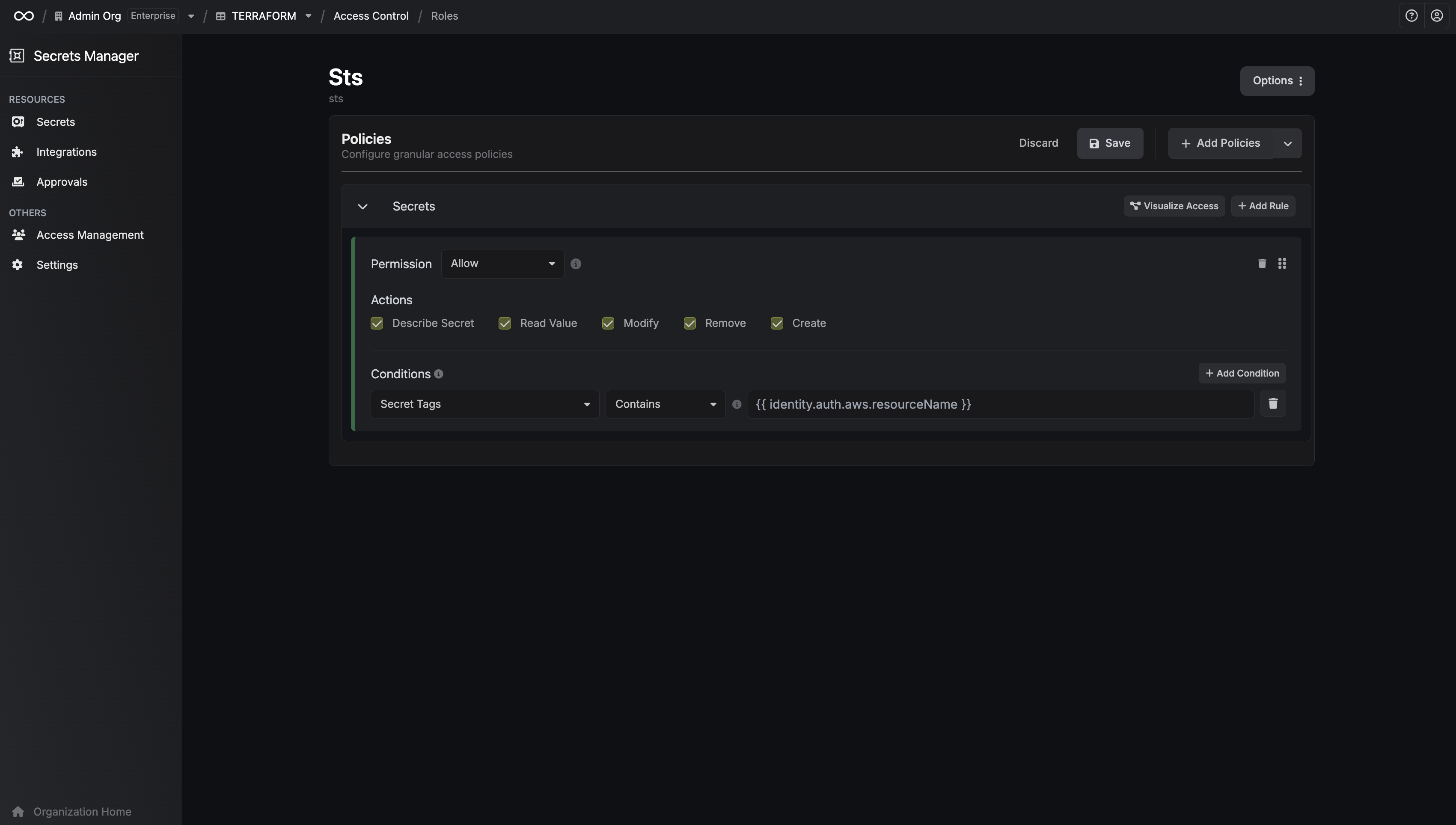
 For identities authenticated using AWS Auth, several attributes can be accessed. On top of the 3 base attributes, there's 4 derived from the ARN. The example below includes comments showing how each derived attribute looks like based on this ARN: `arn:aws:iam::123456789012:user/example-user`
```
{{ identity.auth.aws.accountId }}
{{ identity.auth.aws.arn }}
{{ identity.auth.aws.userId }}
// Derived from ARN
{{ identity.auth.aws.partition }} // aws
{{ identity.auth.aws.service }} // iam
{{ identity.auth.aws.resourceType }} // user
{{ identity.auth.aws.resourceName }} // example-user
```
For identities authenticated using AWS Auth, several attributes can be accessed. On top of the 3 base attributes, there's 4 derived from the ARN. The example below includes comments showing how each derived attribute looks like based on this ARN: `arn:aws:iam::123456789012:user/example-user`
```
{{ identity.auth.aws.accountId }}
{{ identity.auth.aws.arn }}
{{ identity.auth.aws.userId }}
// Derived from ARN
{{ identity.auth.aws.partition }} // aws
{{ identity.auth.aws.service }} // iam
{{ identity.auth.aws.resourceType }} // user
{{ identity.auth.aws.resourceName }} // example-user
```
 At the moment we only support OIDC claims, Kubernetes attributes, and AWS attributes. Payloads on other authentication methods are not yet accessible.
#### Template Helper Functions
In addition to referencing attributes directly, you can use the `stripPrefix` helper function to transform attribute values within your policy templates.
**stripPrefix**
Removes a prefix from the beginning of a string. If the string does not start with the given prefix, it is returned unchanged.
**Examples:**
Given `identity.auth.kubernetes.namespace` = `production-us-east`:
```handlebars theme={"dark"}
{{ stripPrefix identity.auth.kubernetes.namespace 'production-' }} -> us-east
```
Given `identity.auth.aws.arn` = `arn:aws:iam::123456789012:user/example-user`:
```handlebars theme={"dark"}
{{ stripPrefix identity.auth.aws.arn 'arn:aws:iam::123456789012:' }} -> user/example-user
```
At the moment we only support OIDC claims, Kubernetes attributes, and AWS attributes. Payloads on other authentication methods are not yet accessible.
#### Template Helper Functions
In addition to referencing attributes directly, you can use the `stripPrefix` helper function to transform attribute values within your policy templates.
**stripPrefix**
Removes a prefix from the beginning of a string. If the string does not start with the given prefix, it is returned unchanged.
**Examples:**
Given `identity.auth.kubernetes.namespace` = `production-us-east`:
```handlebars theme={"dark"}
{{ stripPrefix identity.auth.kubernetes.namespace 'production-' }} -> us-east
```
Given `identity.auth.aws.arn` = `arn:aws:iam::123456789012:user/example-user`:
```handlebars theme={"dark"}
{{ stripPrefix identity.auth.aws.arn 'arn:aws:iam::123456789012:' }} -> user/example-user
```