> ## Documentation Index
> Fetch the complete documentation index at: https://infisical.com/docs/llms.txt
> Use this file to discover all available pages before exploring further.

# Overview

> Track and investigate every action performed within Infisical.

<Info>
  Audit logs are available under Infisical's [Pro, Advanced, and Enterprise](https://infisical.com/pricing) plans, with retention that varies by plan.

  If you're self-hosting Infisical, contact [sales@infisical.com](mailto:sales@infisical.com) to purchase an Enterprise license.
</Info>

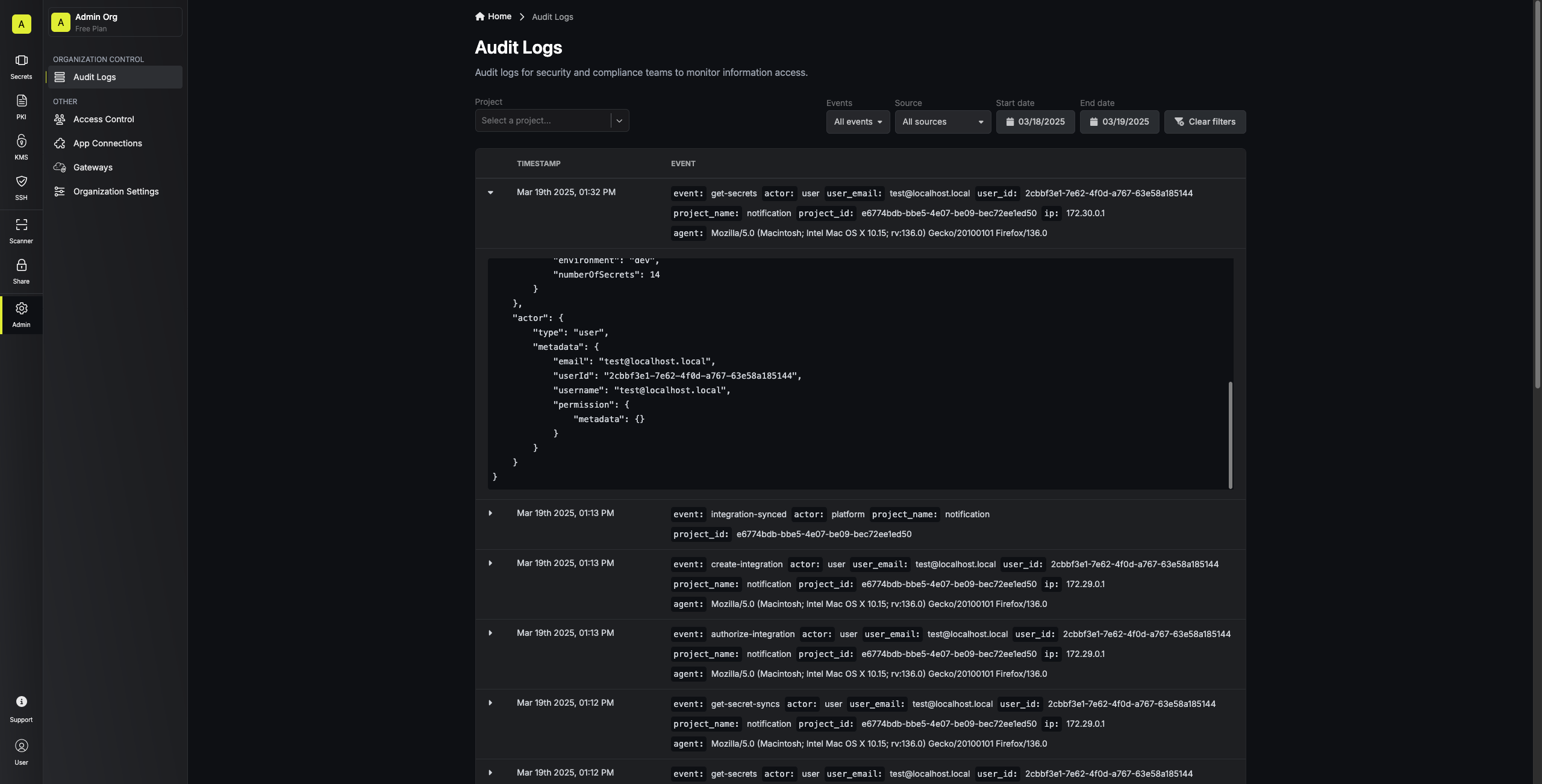
Infisical records every action performed in your organization as a structured event, so security and compliance teams can investigate incidents, prove access boundaries to auditors, and answer questions about who did what.

<Frame>
  <img src="https://mintlify.s3.us-west-1.amazonaws.com/infisical/images/platform/audit-logs/audit-logs-table.png" alt="Audit logs" />
</Frame>

## View audit logs

Anyone with the **Read** permission on **Audit Logs** has access to view audit logs. For more information, check out [Role-based access controls](/docs/documentation/platform/access-controls/role-based-access-controls).

### For an organization

To view all events in an organization across every product:

<Tabs>
  <Tab title="Infisical UI">
    <Steps>
      <Step>
        From your organization's home page, go to **Audit Logs**.
      </Step>

      <Step>
        Narrow down the results with [filters](#filtering-audit-logs).
      </Step>
    </Steps>
  </Tab>

  <Tab title="API">
    Call the endpoint without a `projectId` to get events across the whole organization.

    ```bash theme={"dark"}
    curl -G "https://app.infisical.com/api/v1/organization/audit-logs" \
      -H "Authorization: Bearer <your-access-token>" \
      --data-urlencode "limit=100"
    ```

    See the [audit log export API reference](/docs/api-reference/endpoints/audit-logs/export-audit-log) for the full parameter list.
  </Tab>
</Tabs>

### For a product

To view all events scoped to a single product:

<Tabs>
  <Tab title="Infisical UI">
    <Steps>
      <Step>
        Open the product from the organization sidebar.
      </Step>

      <Step>
        For **Secrets Management**, **Certificate Manager**, **KMS**, and **Secret Scanning**, select the project you want to audit.

        <Note>
          For **Privileged Access Manager** and **Agent Vault**, skip this step.
        </Note>
      </Step>

      <Step>
        Select **Audit Logs** in the product's sidebar.
      </Step>

      <Step>
        Narrow down the results with [filters](#filtering-audit-logs).
      </Step>
    </Steps>
  </Tab>

  <Tab title="API">
    Pass a `projectId` to scope the response to one project's events.

    ```bash theme={"dark"}
    curl -G "https://app.infisical.com/api/v1/organization/audit-logs" \
      -H "Authorization: Bearer <your-access-token>" \
      --data-urlencode "projectId=<project-id>" \
      --data-urlencode "limit=100"
    ```

    See the [audit log export API reference](/docs/api-reference/endpoints/audit-logs/export-audit-log) for the full parameter list.

    <Note>
      **Privileged Access Manager** and **Agent Vault** use a single project that Infisical manages internally. There's no public API for looking up that project's ID.

      Instead, call the organization endpoint (see [For an organization](#for-an-organization)) and filter `eventType` to Privileged Access Manager and Agent Vault [event types](#event-types), (e.g., `eventType=pam-session-start,pam-session-end`).
    </Note>
  </Tab>
</Tabs>

## Log structure

Each log contains the following fields:

<ResponseField name="id" type="string">
  The log entry's UUID.
</ResponseField>

<ResponseField name="ipAddress" type="string">
  The source IP address of the request.
</ResponseField>

<ResponseField name="userAgent" type="string">
  The raw `User-Agent` header of the client.
</ResponseField>

<ResponseField name="userAgentType" type="string">
  The client category: `web`, `cli`, `k8-operator`, `terraform`, `InfisicalPythonSDK`, `InfisicalNodeSDK`, or `other`.
</ResponseField>

<ResponseField name="expiresAt" type="string">
  When Infisical will delete the log entry, based on your plan's retention.
</ResponseField>

<ResponseField name="createdAt" type="string">
  When the action occurred, in ISO 8601 format.
</ResponseField>

<ResponseField name="updatedAt" type="string">
  Always equals `createdAt`. Audit log entries are append-only.
</ResponseField>

<ResponseField name="orgId" type="string">
  The organization the action occurred in.
</ResponseField>

<ResponseField name="projectId" type="string">
  The project the action affected. Empty for organization-level events.
</ResponseField>

<ResponseField name="projectName" type="string">
  The name of the project at the time of the action. Empty for organization-level events.
</ResponseField>

<ResponseField name="event" type="object">
  The action that occurred.

  <Expandable title="properties">
    <ResponseField name="type" type="string">
      The event type (for example, `create-secret`). See [Event types](#event-types) for the full catalog.
    </ResponseField>

    <ResponseField name="class" type="string">
      The [event class](#event-classes) the event type belongs to: `management`, `authentication`, `authorization`, or `data-access`.
    </ResponseField>

    <ResponseField name="metadata" type="object">
      Context specific to the event. The shape depends on `event.type`; a `get-secret` event carries `environment`, `secretPath`, `secretKey`, and `secretVersion`, while a batch event like `create-secrets` carries a `secrets` array.
    </ResponseField>
  </Expandable>
</ResponseField>

<ResponseField name="actor" type="object">
  Who performed the action.

  <Expandable title="properties">
    <ResponseField name="type" type="string">
      The actor category: commonly `user`, `identity`, or `platform`. Machine and system actors add more categories, for example `kmipClient`, `scimClient`, and `gateway`.
    </ResponseField>

    <ResponseField name="metadata" type="object">
      Identifying information for the actor. The shape depends on `actor.type`.

      <Expandable title="user actor">
        <ResponseField name="userId" type="string">
          The user's ID.
        </ResponseField>

        <ResponseField name="email" type="string">
          The user's email.
        </ResponseField>

        <ResponseField name="username" type="string">
          The user's username.
        </ResponseField>

        <ResponseField name="permission" type="object">
          The user's effective permissions at the time of the action.
        </ResponseField>
      </Expandable>

      <Expandable title="identity actor">
        <ResponseField name="identityId" type="string">
          The machine identity's ID.
        </ResponseField>

        <ResponseField name="permission" type="object">
          The identity's effective permissions at the time of the action.
        </ResponseField>
      </Expandable>
    </ResponseField>
  </Expandable>
</ResponseField>

### Example payload

```json expandable theme={"dark"}
{
   "id": "[UUID]",
   "ipAddress": "[IP_ADDRESS]",
   "userAgent": "[USER_AGENT_STRING]",
   "userAgentType": "web",
   "expiresAt": "[TIMESTAMP]",
   "createdAt": "[TIMESTAMP]",
   "updatedAt": "[TIMESTAMP]",
   "orgId": "[ORGANIZATION_UUID]",
   "projectId": "[PROJECT_UUID]",
   "projectName": "[PROJECT_NAME]",
   "event": {
       "type": "get-secret",
       "class": "data-access",
       "metadata": {
           "environment": "prod",
           "secretPath": "/db",
           "secretId": "[SECRET_UUID]",
           "secretKey": "DATABASE_URL",
           "secretVersion": 3
       }
   },
   "actor": {
       "type": "user",
       "metadata": {
           "email": "[EMAIL]",
           "userId": "[USER_UUID]",
           "username": "[USERNAME]",
           "permission": {
               "metadata": {},
               "auth": {}
           }
       }
   }
}
```

## Event classes

Every [event type](/docs/documentation/platform/audit-logs#param-type) belongs to one of four classes, based on the kind of activity the event records.

| Class | What it covers | Default |
| - | - | - |
| `management` | Creates, updates, deletes, membership, roles, policies, background jobs, and the start and end of privileged sessions | Always on |
| `data-access` | Reads and lists, plus the crypto operations that return or operate on secret material, such as KMS encrypt and decrypt | Always on |
| `authentication` | Logins, failed logins, organization selection, machine identity authentication, and Gateway enrollment and connections | On |
| `authorization` | [Permission denials](#permission-denials) | Off |

### Choose which classes to record

You can turn authentication and authorization events on or off. Management and data access events are always recorded, so the log always has every configuration change and every read of secret material.

<Note>
  Recording authorization events requires the new privilege system. If your organization still uses legacy privilege management, the **Authorization** toggle is disabled. To upgrade, go to **Access Control** in your organization and select **Learn More & Upgrade**.
</Note>

<Tabs>
  <Tab title="For an organization">
    These settings cover organization-level events, such as membership and login changes. Projects and sub-organizations have their own settings.

    <Steps>
      <Step>
        From your organization's home page, go to **Audit Logs** and select the **Settings** tab.
      </Step>

      <Step>
        Turn a class on or off, then select **Save Changes**.
      </Step>
    </Steps>

    You need the **Edit** permission on **Audit Logs**, which the admin role has.
  </Tab>

  <Tab title="For a project">
    These settings cover only the project's events.

    <Steps>
      <Step>
        Open the project, go to **Audit Logs**, and select the **Settings** tab.
      </Step>

      <Step>
        Under **Event Classes**, turn a class on or off, then select **Save Changes**.
      </Step>
    </Steps>

    You need the **Edit** permission on **Audit Logs**, which the admin role has.
  </Tab>

  <Tab title="API">
    Update the organization's classes with [the organization audit log settings endpoint](/docs/api-reference/endpoints/audit-logs/update-organization-audit-log-settings), or one project's classes with [the project audit log settings endpoint](/docs/api-reference/endpoints/audit-logs/update-project-audit-log-settings). The request replaces the current settings, so include both `authentication` and `authorization`.

    ```bash theme={"dark"}
    curl -X PUT "https://app.infisical.com/api/v1/organization/audit-log-settings" \
      -H "Authorization: Bearer <your-access-token>" \
      -H "Content-Type: application/json" \
      -d '{
        "eventClasses": [
          {"eventClass": "authentication", "isEnabled": true},
          {"eventClass": "authorization", "isEnabled": false}
        ]
      }'
    ```
  </Tab>
</Tabs>

<Info>
  Any changes you make apply to new events within 10 minutes. Events already in the log aren't affected.
</Info>

### Permission denials

If you [turn authorization events on](#choose-which-classes-to-record), Infisical records a `permission-denied` event whenever a user or machine identity tries an action its role doesn't allow. The event's metadata includes:

| Field | What it contains |
| - | - |
| `permissionAction` | The action the role didn't allow, such as `create` |
| `permissionSubject` | The resource type the action was on, such as `secrets` |
| `permissionSubjectDetails` | The resource the actor targeted, such as an environment and secret path |
| `route` | The endpoint the actor called |
| `method` | The HTTP method of the request |
| `projectId` | The project the request was for, if it had one |

<Info>
  If the same denial repeats within a minute, Infisical records it once, then records one summary event with the number of repeats in `suppressedRepeats`. The summary's `suppressedFrom` and `suppressedUntil` fields give the start and end of the interval covered by that count.
</Info>

## Filtering audit logs

You can filter audit logs to find events more easily. When you set more than one filter, an event needs to match all of them to appear in the results.

<Note>
  Every filter is an exact match, so wildcards like `*` aren't supported.
</Note>

### By date

<Tabs>
  <Tab title="Infisical UI">
    Use the date range buttons at the top of the audit logs page. The page defaults to the last hour on load. Presets include 1 day, 1 week, 1 month, and 3 months, and the custom picker takes any range up to 3 months.
  </Tab>

  <Tab title="API">
    Pass `startDate` and `endDate` as ISO 8601 timestamps, up to 3 months apart. If you omit `startDate`, the endpoint defaults to the previous day at 00:00 UTC; if you omit `endDate`, it defaults to now.

    ```bash theme={"dark"}
    curl -G "https://app.infisical.com/api/v1/organization/audit-logs" \
      -H "Authorization: Bearer <your-access-token>" \
      --data-urlencode "startDate=2026-01-01T00:00:00Z" \
      --data-urlencode "endDate=2026-01-31T23:59:59Z"
    ```
  </Tab>
</Tabs>

### Advanced filters

<Tabs>
  <Tab title="Infisical UI">
    Select **Search audit logs** from the audit logs menu and choose the filter you want to add:

    | Filter | Matches | Requires |
    | - | - | - |
    | `event` | One or more event types (for example, `create-secret`, `update-secret`) | |
    | `class` | One or more [event classes](#event-classes) (for example, `data-access`, `authorization`) | |
    | `actor` | The actor type (for example, `user`, `identity`, `platform`, `kmipClient`, `scimClient`, and so on) | |
    | `actor_id` | A specific actor ID | `actor` set to a type that carries an ID (see below) |
    | `source` | The client that made the request: `web`, `cli`, `k8-operator`, `terraform`, an SDK, or `other` | |
    | `project` | A single project | |
    | `environment` | An environment slug in that project (for example, `prod`) | `project`; applies to secret events only |
    | `secret_path` | The folder path a secret event touched (for example, `/db`) | `project`; applies to secret events only |
    | `secret_key` | The exact key name a secret event touched (for example, `DATABASE_URL`) | `project`; applies to secret events only |
  </Tab>

  <Tab title="API">
    Pass filters as query parameters to `GET /api/v1/organization/audit-logs`:

    | Parameter | Matches | Requires |
    | - | - | - |
    | `eventType` | One or more event types, comma-separated (for example, `create-secret,update-secret`) | |
    | `eventClass` | One or more [event classes](#event-classes), comma-separated (for example, `data-access,authorization`) | |
    | `actorType` | The actor type (for example, `user`, `identity`, `platform`, `kmipClient`, `scimClient`) | |
    | `actor` | A specific actor ID | `actorType` set to a type that carries an ID (see below) |
    | `userAgentType` | The client that made the request: `web`, `cli`, `k8-operator`, `terraform`, an SDK, or `other` | |
    | `projectId` | A single project | |
    | `environment` | An environment slug in that project (for example, `prod`) | `projectId`; applies to secret events only |
    | `secretPath` | The folder path a secret event touched (for example, `/db`) | `projectId`; applies to secret events only |
    | `secretKey` | The exact key name a secret event touched (for example, `DATABASE_URL`) | `projectId`; applies to secret events only |
    | `eventMetadata` | A key/value pair inside `event.metadata`. See [Filtering by event metadata](#filtering-by-event-metadata). | |
  </Tab>
</Tabs>

<Note>
  Actor ID filtering is only supported for actor types that carry an ID: `user`, `identity`, `service`, `kmipClient`, `kmipServer`, `gateway`, `relay`, `agentVaultProxy`, `acmeProfile`, `acmeAccount`, `estAccount`, and `scepAccount`.

  `platform`, `scimClient`, and `unknownUser` don't have an ID field and can only be filtered by type.
</Note>

### Special characters

Every filter compares the raw string value as-is, so filter values that contain `$`, `.`, `/`, `@`, or any other special character work without escaping.

For example, to filter for a secret key named `$DB/PROD.URL`:

```bash theme={"dark"}
curl -G "https://app.infisical.com/api/v1/organization/audit-logs" \
  -H "Authorization: Bearer <your-access-token>" \
  --data-urlencode "projectId=<project-id>" \
  --data-urlencode "eventType=get-secret" \
  --data-urlencode "secretKey=\$DB/PROD.URL"
```

In the above example, `\$` is only there to stop the shell from expanding `$DB` as a variable. The filter itself takes `$DB/PROD.URL` as-is.

### Filtering by event metadata

The API accepts an `eventMetadata` query parameter that matches key/value pairs inside `event.metadata`. Pass it as `key1=value1,key2=value2`. Every pair has to match on the same event.

Use it for queries the built-in filters can't express, like every login for a specific identity, or every secret sync run for a specific destination:

```bash theme={"dark"}
curl -G "https://app.infisical.com/api/v1/organization/audit-logs" \
  -H "Authorization: Bearer <your-access-token>" \
  --data-urlencode "eventType=login-identity-universal-auth" \
  --data-urlencode "eventMetadata=identityId=<identity-id>"
```

<Note>
  Values that contain a literal `,` can't be filtered this way, because `,` separates the pairs. Values with `=` work: only the first `=` in each pair is treated as the separator, so the rest of the string passes through.
</Note>

## Common filters

Here are a few common patterns for filtering audit logs, grouped by product.

### Secrets Manager

<AccordionGroup>
  <Accordion title="Who read a specific secret">
    Find every read of `DATABASE_URL` in the `prod` environment.

    <Tabs>
      <Tab title="Infisical UI">
        <Steps>
          <Step>
            Go to **Organization > Audit Logs**.
          </Step>

          <Step>
            Select **Search audit logs** and add these filters:

            * `event`: `get-secret`
            * `project`: the project holding the secret
            * `environment`: `prod`
            * `secret_key`: `DATABASE_URL`
          </Step>
        </Steps>
      </Tab>

      <Tab title="API">
        ```bash theme={"dark"}
        curl -G "https://app.infisical.com/api/v1/organization/audit-logs" \
          -H "Authorization: Bearer <your-access-token>" \
          --data-urlencode "projectId=<project-id>" \
          --data-urlencode "environment=prod" \
          --data-urlencode "eventType=get-secret" \
          --data-urlencode "secretKey=DATABASE_URL"
        ```
      </Tab>
    </Tabs>
  </Accordion>

  <Accordion title="Who opened a folder">
    Find every time someone loaded the secrets in the `/db` folder — for example, by opening it in the web UI, running `infisical sm secrets`, or having an app fetch it at startup. Each event records the folder, the actor, and how many secrets came back.

    <Tabs>
      <Tab title="Infisical UI">
        <Steps>
          <Step>
            Go to **Organization > Audit Logs**.
          </Step>

          <Step>
            Select **Search audit logs** and add these filters:

            * `event`: `get-secrets`
            * `project`: the project holding the folder
            * `environment`: `prod`
            * `secret_path`: `/db`
          </Step>
        </Steps>
      </Tab>

      <Tab title="API">
        ```bash theme={"dark"}
        curl -G "https://app.infisical.com/api/v1/organization/audit-logs" \
          -H "Authorization: Bearer <your-access-token>" \
          --data-urlencode "projectId=<project-id>" \
          --data-urlencode "environment=prod" \
          --data-urlencode "eventType=get-secrets" \
          --data-urlencode "secretPath=/db"
        ```
      </Tab>
    </Tabs>
  </Accordion>

  <Accordion title="All writes to production">
    Find every creation, update, and deletion of secrets in a project's `prod` environment over the last 7 days.

    <Tabs>
      <Tab title="Infisical UI">
        <Steps>
          <Step>
            Go to **Organization > Audit Logs**.
          </Step>

          <Step>
            Set the date range to the last 7 days.
          </Step>

          <Step>
            Select **Search audit logs** and add these filters:

            * `event`: `create-secret`, `update-secret`, `delete-secret`, `create-secrets`, `update-secrets`, `delete-secrets`
            * `project`: the project you want to audit
            * `environment`: `prod`
          </Step>
        </Steps>

        Include the batch event types (`create-secrets`, `update-secrets`, `delete-secrets`) so that bulk changes from the CLI or SDKs aren't missed. The `environment` filter only applies when a project is set.
      </Tab>

      <Tab title="API">
        Replace `<start-date>` with an ISO 8601 timestamp for 7 days ago (for example, `2026-09-15T00:00:00Z`).

        ```bash theme={"dark"}
        curl -G "https://app.infisical.com/api/v1/organization/audit-logs" \
          -H "Authorization: Bearer <your-access-token>" \
          --data-urlencode "projectId=<project-id>" \
          --data-urlencode "environment=prod" \
          --data-urlencode "eventType=create-secret,update-secret,delete-secret,create-secrets,update-secrets,delete-secrets" \
          --data-urlencode "startDate=<start-date>"
        ```

        Include the batch event types (`create-secrets`, `update-secrets`, `delete-secrets`) so that bulk changes from the CLI or SDKs aren't missed.
      </Tab>
    </Tabs>
  </Accordion>

  <Accordion title="Who deleted a secret">
    Find who removed a specific secret key. Include the batch event so single and bulk deletes are both matched.

    <Tabs>
      <Tab title="Infisical UI">
        <Steps>
          <Step>
            Go to **Organization > Audit Logs**.
          </Step>

          <Step>
            Select **Search audit logs** and add these filters:

            * `event`: `delete-secret`, `delete-secrets`
            * `project`: the project holding the secret
            * `secret_key`: the key that was deleted
          </Step>
        </Steps>

        Read the actor column on each result to see who ran the delete. The `secret_key` filter only applies when a project is set.
      </Tab>

      <Tab title="API">
        ```bash theme={"dark"}
        curl -G "https://app.infisical.com/api/v1/organization/audit-logs" \
          -H "Authorization: Bearer <your-access-token>" \
          --data-urlencode "projectId=<project-id>" \
          --data-urlencode "eventType=delete-secret,delete-secrets" \
          --data-urlencode "secretKey=DATABASE_URL"
        ```

        Read `actor.type` and `actor.metadata` on each result to see who ran the delete.
      </Tab>
    </Tabs>
  </Accordion>
</AccordionGroup>

### Certificate Manager

<AccordionGroup>
  <Accordion title="Recent certificate issuance">
    Find every certificate issued from a project in the last 7 days.

    <Note>
      Externally-issued certificates (from a linked external CA) don't emit an issuance audit event when Infisical attaches the certificate. The `order-certificate-from-profile` event captures the request at submit time (typically with `event.metadata.status = pending`), and Infisical doesn't update the audit row later. To confirm which orders resulted in issued certificates, check the certificate list in **Certificate Manager**.
    </Note>

    <Tabs>
      <Tab title="Infisical UI">
        <Steps>
          <Step>
            Go to **Certificate Manager**, select the project, and open **Audit Logs**.
          </Step>

          <Step>
            Set the date range to the last 7 days.
          </Step>

          <Step>
            Select **Search audit logs** and add:

            * `event`: `issue-cert`, `issue-pki-subscriber-cert`, `issue-certificate-from-profile`
          </Step>
        </Steps>

        The returned `event.metadata` varies by issuance path:

        * `issue-cert` records the certificate authority (CA), its distinguished name (DN), and serial number
        * Subscriber and profile events record the subscriber or profile ID and common name, with the serial number added once the certificate is issued
      </Tab>

      <Tab title="API">
        ```bash theme={"dark"}
        curl -G "https://app.infisical.com/api/v1/organization/audit-logs" \
          -H "Authorization: Bearer <your-access-token>" \
          --data-urlencode "projectId=<project-id>" \
          --data-urlencode "eventType=issue-cert,issue-pki-subscriber-cert,issue-certificate-from-profile" \
          --data-urlencode "startDate=<start-date>"
        ```
      </Tab>
    </Tabs>
  </Accordion>

  <Accordion title="Why a certificate failed to issue" id="certificate-issuance-failures">
    Find every certificate that Infisical couldn't issue, and the reason for each failure.

    Infisical records a `certificate-issuance-failed` event for certificates requested from a certificate profile through the API or the Infisical UI, ACME, EST, and SCEP, including renewals and certificates issued after an approval.

    <Note>
      If an automatic renewal fails before Infisical sends it to an external CA, Infisical records an `automated-renew-certificate-failed` event instead. Infisical doesn't record `certificate-issuance-failed` for EST enrollment through a certificate template, for EST requests rejected before Infisical reads the CSR (such as a failed sign-in or a rejected client certificate), or for requests the actor's role doesn't allow, which are recorded as [`permission-denied` events](#permission-denials).
    </Note>

    <Tabs>
      <Tab title="Infisical UI">
        <Steps>
          <Step>
            In **Certificate Manager**, open **Audit Logs**.
          </Step>

          <Step>
            Select **Search audit logs** and add:

            * `event`: `certificate-issuance-failed`
          </Step>
        </Steps>
      </Tab>

      <Tab title="API">
        This request returns failures from across your organization, so the access token needs permission to read the organization's audit logs.

        ```bash theme={"dark"}
        curl -G "https://app.infisical.com/api/v1/organization/audit-logs" \
          -H "Authorization: Bearer <your-access-token>" \
          --data-urlencode "eventType=certificate-issuance-failed"
        ```
      </Tab>
    </Tabs>

    The `event.metadata` of each result records which certificate failed and why:

    * `operation`: what was requested (`issue`, `sign`, `order`, or `renew`)
    * `enrollmentType`: how the certificate was requested (`api`, `acme`, `est`, or `scep`)
    * `error` and `errorName`: why issuance failed, such as a TTL longer than the certificate policy allows or an error from the CA
    * `certificateProfileId`, `profileName`, `caId`, `caName`, `commonName`, `applicationId`, and `applicationName`: the certificate the request was for, where Infisical knows them
    * `certificateRequestId`: the certificate request that failed, if Infisical had already created one
    * `originalCertificateId`: on a failed renewal, the certificate being renewed
    * `suppressedRepeats`, `suppressedFrom`, and `suppressedUntil`: on a summary event, how many identical failures Infisical counted instead of recording, and the minute they fell in

    The event's actor is `platform` if issuance fails after the original request has returned. That happens in two cases: an external CA, such as DigiCert or AWS Private CA, fails the order in the background, or issuance fails once an approver approves the request. An approved request for an external CA goes through the same background step. To find who requested a certificate through the API or the Infisical UI, filter by the original event, such as `order-certificate-from-profile`, and match the `certificateRequestId`.

    Infisical counts identical failures the same way it counts [repeated denials](#permission-denials). In each minute, it records the first failure with a given actor, operation, certificate, and error, then writes one summary event when the minute ends.
  </Accordion>

  <Accordion title="Who revoked a certificate">
    Find every revocation in a project.

    <Tabs>
      <Tab title="Infisical UI">
        <Steps>
          <Step>
            Go to **Certificate Manager**, select the project, and open **Audit Logs**.
          </Step>

          <Step>
            Select **Search audit logs** and add:

            * `event`: `revoke-cert`
          </Step>
        </Steps>

        Read the actor column on each result to see who ran the revocation.
      </Tab>

      <Tab title="API">
        ```bash theme={"dark"}
        curl -G "https://app.infisical.com/api/v1/organization/audit-logs" \
          -H "Authorization: Bearer <your-access-token>" \
          --data-urlencode "projectId=<project-id>" \
          --data-urlencode "eventType=revoke-cert"
        ```
      </Tab>
    </Tabs>
  </Accordion>
</AccordionGroup>

### KMS

<AccordionGroup>
  <Accordion title="Recent key use">
    Find every encryption, decryption, signature, and verification against KMS keys in a project.

    <Tabs>
      <Tab title="Infisical UI">
        <Steps>
          <Step>
            Go to **KMS**, select the project, and open **Audit Logs**.
          </Step>

          <Step>
            Select **Search audit logs** and add:

            * `event`: `cmek-encrypt`, `cmek-decrypt`, `cmek-sign`, `cmek-verify`
          </Step>
        </Steps>

        To narrow the results to a specific key, read `event.metadata.keyId` on each row.
      </Tab>

      <Tab title="API">
        `cmek-*` events carry `keyId` in `event.metadata`, so match it with `eventMetadata` to scope to a specific key.

        ```bash theme={"dark"}
        curl -G "https://app.infisical.com/api/v1/organization/audit-logs" \
          -H "Authorization: Bearer <your-access-token>" \
          --data-urlencode "projectId=<project-id>" \
          --data-urlencode "eventType=cmek-encrypt,cmek-decrypt,cmek-sign,cmek-verify" \
          --data-urlencode "eventMetadata=keyId=<kms-key-id>"
        ```
      </Tab>
    </Tabs>
  </Accordion>

  <Accordion title="Key lifecycle changes">
    Find every KMS key created, updated, or deleted in a project.

    <Tabs>
      <Tab title="Infisical UI">
        <Steps>
          <Step>
            Go to **KMS**, select the project, and open **Audit Logs**.
          </Step>

          <Step>
            Select **Search audit logs** and add:

            * `event`: `create-cmek`, `update-cmek`, `delete-cmek`
          </Step>
        </Steps>
      </Tab>

      <Tab title="API">
        ```bash theme={"dark"}
        curl -G "https://app.infisical.com/api/v1/organization/audit-logs" \
          -H "Authorization: Bearer <your-access-token>" \
          --data-urlencode "projectId=<project-id>" \
          --data-urlencode "eventType=create-cmek,update-cmek,delete-cmek"
        ```
      </Tab>
    </Tabs>
  </Accordion>
</AccordionGroup>

### Secret Scanning

<AccordionGroup>
  <Accordion title="Recent scan runs">
    Find every completed scan run in the last 7 days (both scheduled and on-demand). Each row represents one run, and `event.metadata` records the data source, the scan type, and the status. Successful runs also include `numberOfSecretsDetected`.

    <Tabs>
      <Tab title="Infisical UI">
        <Steps>
          <Step>
            Go to **Secret Scanning**, select the project, and open **Audit Logs**.
          </Step>

          <Step>
            Set the date range to the last 7 days.
          </Step>

          <Step>
            Select **Search audit logs** and add:

            * `event`: `secret-scanning-data-source-scan`
          </Step>
        </Steps>

        To also see the request rows for on-demand scans (which fire before the run completes), add `secret-scanning-data-source-trigger-scan` to the `event` filter. On-demand scans then appear twice: once as a trigger and once as a completed run.
      </Tab>

      <Tab title="API">
        ```bash theme={"dark"}
        curl -G "https://app.infisical.com/api/v1/organization/audit-logs" \
          -H "Authorization: Bearer <your-access-token>" \
          --data-urlencode "projectId=<project-id>" \
          --data-urlencode "eventType=secret-scanning-data-source-scan" \
          --data-urlencode "startDate=<start-date>"
        ```

        Add `secret-scanning-data-source-trigger-scan` to `eventType` to also see the request rows for on-demand scans. On-demand scans then appear twice: once as a trigger and once as a completed run.
      </Tab>
    </Tabs>
  </Accordion>

  <Accordion title="Finding updates">
    View every finding an operator marked as remediated, dismissed, or otherwise updated.

    <Tabs>
      <Tab title="Infisical UI">
        <Steps>
          <Step>
            Go to **Secret Scanning**, select the project, and open **Audit Logs**.
          </Step>

          <Step>
            Select **Search audit logs** and add:

            * `event`: `secret-scanning-finding-update`
          </Step>
        </Steps>
      </Tab>

      <Tab title="API">
        ```bash theme={"dark"}
        curl -G "https://app.infisical.com/api/v1/organization/audit-logs" \
          -H "Authorization: Bearer <your-access-token>" \
          --data-urlencode "projectId=<project-id>" \
          --data-urlencode "eventType=secret-scanning-finding-update"
        ```
      </Tab>
    </Tabs>
  </Accordion>
</AccordionGroup>

### Privileged Access Manager

<AccordionGroup>
  <Accordion title="All privileged sessions this week">
    Find every session start, end, or termination in the last 7 days.

    <Tabs>
      <Tab title="Infisical UI">
        <Steps>
          <Step>
            Go to **PAM > Audit Logs**.
          </Step>

          <Step>
            Set the date range to the last 7 days.
          </Step>

          <Step>
            Select **Search audit logs** and add:

            * `event`: `pam-session-start`, `pam-session-end`, `pam-session-terminate`
          </Step>
        </Steps>
      </Tab>

      <Tab title="API">
        The PAM project ID isn't exposed publicly, so call the organization endpoint and filter by exact event names.

        ```bash theme={"dark"}
        curl -G "https://app.infisical.com/api/v1/organization/audit-logs" \
          -H "Authorization: Bearer <your-access-token>" \
          --data-urlencode "eventType=pam-session-start,pam-session-end,pam-session-terminate" \
          --data-urlencode "startDate=<start-date>"
        ```
      </Tab>
    </Tabs>
  </Accordion>

  <Accordion title="Who accessed a specific PAM account">
    View all access to a PAM account using its account ID.

    <Tabs>
      <Tab title="Infisical UI">
        <Steps>
          <Step>
            Go to **PAM > Audit Logs**.
          </Step>

          <Step>
            Select **Search audit logs** and add:

            * `event`: `pam-account-access`, `pam-account-credentials-view`
          </Step>
        </Steps>

        Each result's `event.metadata.accountId` names the account and `actor` names the accessor.
      </Tab>

      <Tab title="API">
        `pam-account-access` events carry `accountId` in `event.metadata`, so match it with `eventMetadata`.

        ```bash theme={"dark"}
        curl -G "https://app.infisical.com/api/v1/organization/audit-logs" \
          -H "Authorization: Bearer <your-access-token>" \
          --data-urlencode "eventType=pam-account-access,pam-account-credentials-view" \
          --data-urlencode "eventMetadata=accountId=<pam-account-id>"
        ```
      </Tab>
    </Tabs>
  </Accordion>
</AccordionGroup>

### Agent Vault

<AccordionGroup>
  <Accordion title="Sessions issued this week">
    Find every Agent Vault session minted or revoked over the last 7 days.

    <Tabs>
      <Tab title="Infisical UI">
        <Steps>
          <Step>
            Go to **Agent Vault > Audit Logs**.
          </Step>

          <Step>
            Set the date range to the last 7 days.
          </Step>

          <Step>
            Select **Search audit logs** and add:

            * `event`: `agent-vault-session-mint`, `agent-vault-session-revoke`
          </Step>
        </Steps>
      </Tab>

      <Tab title="API">
        ```bash theme={"dark"}
        curl -G "https://app.infisical.com/api/v1/organization/audit-logs" \
          -H "Authorization: Bearer <your-access-token>" \
          --data-urlencode "eventType=agent-vault-session-mint,agent-vault-session-revoke" \
          --data-urlencode "startDate=<start-date>"
        ```
      </Tab>
    </Tabs>
  </Accordion>

  <Accordion title="Proxy lifecycle events">
    Find every proxy registration, enrollment, and revocation.

    <Tabs>
      <Tab title="Infisical UI">
        <Steps>
          <Step>
            Go to **Agent Vault > Audit Logs**.
          </Step>

          <Step>
            Select **Search audit logs** and add:

            * `event`: `agent-vault-proxy-register`, `agent-vault-proxy-enroll`, `agent-vault-proxy-revoke`, `agent-vault-proxy-delete`
          </Step>
        </Steps>
      </Tab>

      <Tab title="API">
        ```bash theme={"dark"}
        curl -G "https://app.infisical.com/api/v1/organization/audit-logs" \
          -H "Authorization: Bearer <your-access-token>" \
          --data-urlencode "eventType=agent-vault-proxy-register,agent-vault-proxy-enroll,agent-vault-proxy-revoke,agent-vault-proxy-delete"
        ```
      </Tab>
    </Tabs>
  </Accordion>
</AccordionGroup>

### Identities and authentication

<AccordionGroup>
  <Accordion title="Everything a specific identity did">
    Investigate every action a machine identity took.

    <Tabs>
      <Tab title="Infisical UI">
        <Steps>
          <Step>
            Go to **Organization > Audit Logs**.
          </Step>

          <Step>
            Select **Search audit logs** and add these filters:

            * `actor`: `identity`
            * `actor_id`: the identity's ID
          </Step>
        </Steps>
      </Tab>

      <Tab title="API">
        ```bash theme={"dark"}
        curl -G "https://app.infisical.com/api/v1/organization/audit-logs" \
          -H "Authorization: Bearer <your-access-token>" \
          --data-urlencode "actor=<identity-id>" \
          --data-urlencode "actorType=identity"
        ```

        Set `actorType` for any non-user actor so the filter targets the right ID column. Only actor types with an ID field can be filtered this way; see the note under [Advanced filters](#advanced-filters) for the full list.
      </Tab>
    </Tabs>
  </Accordion>

  <Accordion title="Failed login attempts for an identity">
    Find failed login attempts by a machine identity, across every auth method.

    <Tabs>
      <Tab title="Infisical UI">
        <Steps>
          <Step>
            Go to **Organization > Audit Logs**.
          </Step>

          <Step>
            Select **Search audit logs** and add these filters:

            * `event`: `login-identity-universal-auth-failed`, `login-identity-kubernetes-auth-failed`, `login-identity-oidc-auth-failed`, `login-identity-gcp-auth-failed`, `login-identity-aws-auth-failed`, `login-identity-jwt-auth-failed`
            * `actor`: `identity`
            * `actor_id`: the identity's ID
          </Step>
        </Steps>

        Extend the `event` list to include any other `*-failed` variants your organization uses (SPIFFE, LDAP, AliCloud, and so on).
      </Tab>

      <Tab title="API">
        ```bash theme={"dark"}
        curl -G "https://app.infisical.com/api/v1/organization/audit-logs" \
          -H "Authorization: Bearer <your-access-token>" \
          --data-urlencode "eventType=login-identity-universal-auth-failed,login-identity-kubernetes-auth-failed,login-identity-oidc-auth-failed,login-identity-gcp-auth-failed,login-identity-aws-auth-failed,login-identity-jwt-auth-failed" \
          --data-urlencode "actor=<identity-id>" \
          --data-urlencode "actorType=identity"
        ```
      </Tab>
    </Tabs>
  </Accordion>
</AccordionGroup>

## Event types

Infisical emits hundreds of event types. Here are some of the most common ones you'll encounter.

<AccordionGroup>
  <Accordion title="Secrets">
    | Event | When it fires |
    | - | - |
    | `get-secret` | A caller read a specific secret. |
    | `get-secrets` | A caller listed the secrets in a folder. |
    | `reveal-secret` | A user revealed a secret value in the UI. |
    | `create-secret`, `create-secrets` | A caller created a secret (single or batch). |
    | `update-secret`, `update-secrets` | A caller edited a secret (single or batch). |
    | `delete-secret`, `delete-secrets` | A caller deleted a secret (single or batch). |
    | `move-secrets` | A user moved secrets to another folder or environment. |
    | `duplicate-secret` | A user copied a secret to another folder or environment. |
    | `redact-secret-version-value` | An admin redacted a value from a secret's version history. |
  </Accordion>

  <Accordion title="Identities and authentication">
    | Event | When it fires |
    | - | - |
    | `create-identity`, `update-identity`, `delete-identity` | A machine identity was added, edited, or removed. |
    | `login-identity-*` (for example, `login-identity-universal-auth`, `login-identity-kubernetes-auth`, `login-identity-oidc-auth`, `login-identity-gcp-auth`, `login-identity-aws-auth`) | A machine identity authenticated. |
    | `login-identity-*-failed` | A machine identity's authentication attempt failed. |
    | `create-identity-universal-auth-client-secret`, `revoke-identity-universal-auth-client-secret` | A universal-auth client secret was issued or revoked. |
    | `clear-identity-universal-auth-lockouts`, `clear-identity-ldap-auth-lockouts` | An admin cleared a machine identity's lockout. |
  </Accordion>

  <Accordion title="Projects and access">
    | Event | When it fires |
    | - | - |
    | `create-project`, `update-project`, `delete-project` | A project was created, edited, or deleted. |
    | `create-identity-project-membership`, `update-identity-project-membership`, `delete-identity-project-membership` | A machine identity joined, changed role in, or left a project. |
    | `update-user-org-membership`, `delete-user-org-membership` | A user's role or membership in the organization changed. |
  </Accordion>

  <Accordion title="Integrations and secret sync">
    | Event | When it fires |
    | - | - |
    | `create-integration`, `delete-integration`, `manual-sync-integration` | A legacy integration was added, removed, or manually re-synced. |
    | `create-secret-sync`, `update-secret-sync`, `delete-secret-sync` | A user configured a secret sync destination. |
    | `secret-sync-sync-secrets`, `secret-sync-import-secrets`, `secret-sync-remove-secrets` | A sync run pushed, imported, or removed secrets from its destination. |
  </Accordion>

  <Accordion title="Approvals">
    | Event | When it fires |
    | - | - |
    | `approval-request-create`, `approval-request-approve`, `approval-request-reject`, `approval-request-cancel` | The lifecycle of an approval request. |
    | `access-approval-request-create`, `access-approval-request-review`, `access-approval-request-update`, `access-approval-request-revoke` | The lifecycle of an access approval request. |
    | `secret-approval-request`, `secret-approval-request-review`, `secret-approval-merged`, `secret-approval-closed`, `secret-approval-reopened` | The lifecycle of a secret change request. |
    | `approval-policy-create`, `approval-policy-update`, `approval-policy-delete` | An admin changed an approval policy. |
  </Accordion>

  <Accordion title="Authorization">
    | Event | When it fires |
    | - | - |
    | `permission-denied` | A user or machine identity was refused an action its role doesn't allow. See [Permission denials](#permission-denials). |
  </Accordion>

  <Accordion title="Audit logs">
    | Event | When it fires |
    | - | - |
    | `view-audit-logs` | A user opened the audit log viewer. |
    | `update-audit-log-settings` | An admin changed which event classes an organization or project records, or how long a project keeps its audit logs. |
    | `create-audit-report`, `get-audit-report`, `get-audit-reports`, `delete-audit-report` | A user managed a project-level audit report. |
    | `create-org-audit-report`, `get-org-audit-reports`, `delete-org-audit-report` | A user managed an organization-level audit report. |
  </Accordion>
</AccordionGroup>

For the full event catalog and every field the API accepts, see the [audit log export API reference](/docs/api-reference/endpoints/audit-logs/export-audit-log).

## Next steps

<CardGroup cols={2}>
  <Card title="Stream audit logs" icon="arrow-up-from-line" href="/docs/documentation/platform/audit-log-streams/audit-log-streams">
    Forward audit logs to a SIEM, storage bucket, or observability stack.
  </Card>

  <Card title="ClickHouse storage backend" icon="database" href="/docs/documentation/platform/audit-logs-clickhouse-setup">
    Keep queries fast when a self-hosted audit log table grows to hundreds of millions of rows.
  </Card>
</CardGroup>


This documentation is built and hosted on [Mintlify](https://mintlify.com), a developer documentation platform.