> ## Documentation Index
> Fetch the complete documentation index at: https://infisical.com/docs/llms.txt
> Use this file to discover all available pages before exploring further.
# Machine Identities
> Learn how to use Machine Identities to programmatically interact with Infisical.
## Concept
An Infisical machine identity is an entity that represents a workload or application that require access to various resources in Infisical. This is conceptually similar to an IAM user in AWS or service account in Google Cloud Platform (GCP).
Each identity must authenticate with the Infisical API using a supported authentication method like [Token Auth](/docs/documentation/platform/identities/token-auth), [Universal Auth](/docs/documentation/platform/identities/universal-auth), [Kubernetes Auth](/docs/documentation/platform/identities/kubernetes-auth), [AWS Auth](/docs/documentation/platform/identities/aws-auth), [Azure Auth](/docs/documentation/platform/identities/azure-auth), or [GCP Auth](/docs/documentation/platform/identities/gcp-auth) to get back a short-lived access token to be used in subsequent requests.
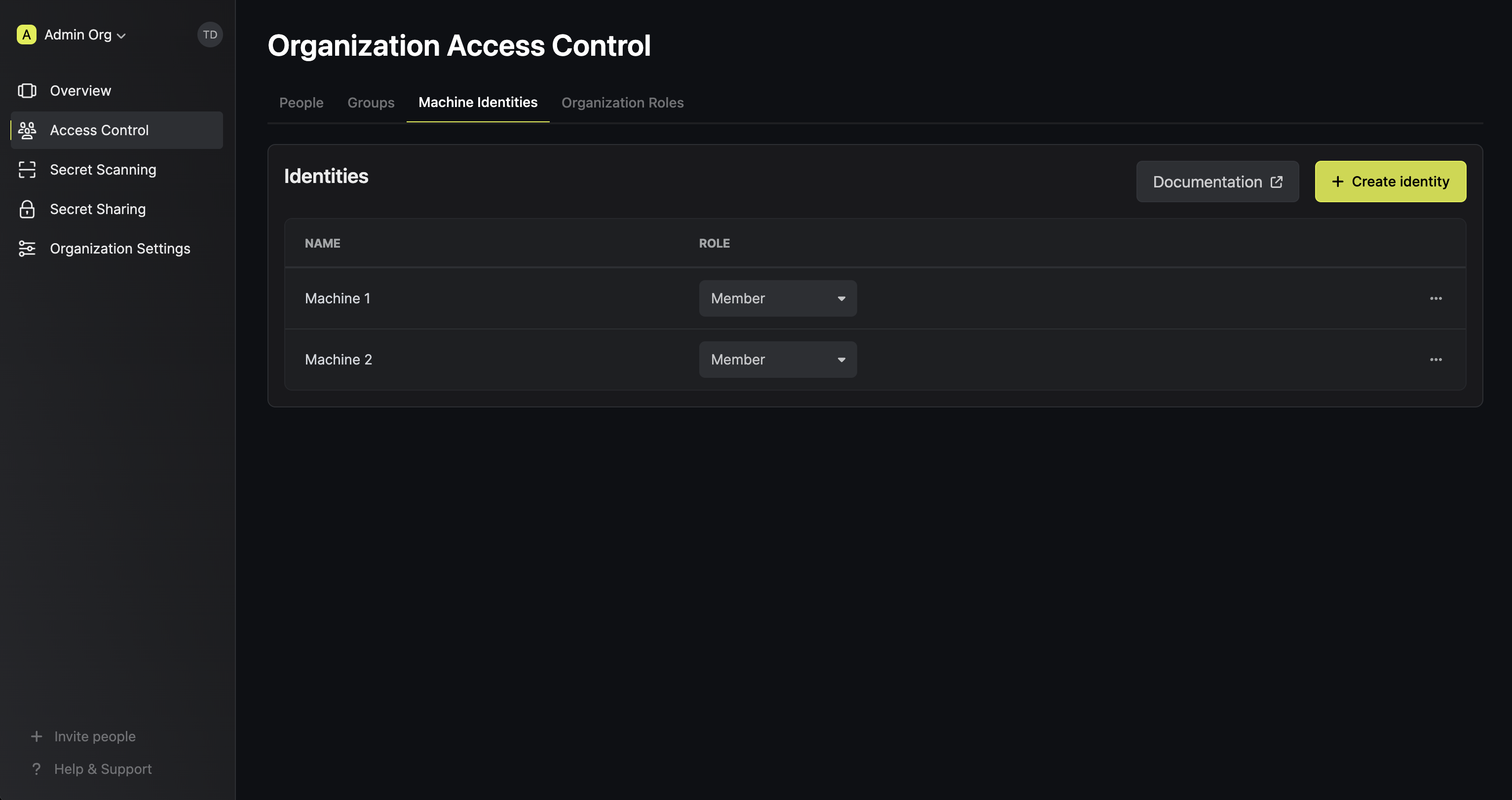 Key Features:
* Role Assignment: Identities must be assigned [roles](/docs/documentation/platform/access-controls/role-based-access-controls). These roles determine the scope of access to resources, either at the organization level or project level.
* Auth/Token Configuration: Identities must be configured with corresponding authentication methods and access token properties to securely interact with the Infisical API.
* Expiry Alerting: Identities with expiring credentials can notify your team ahead of time via [Credential Expiry Alerts](#credential-expiry-alerts).
## Scopes
Identities can be created either at the organization-level or the project-level. Outside of identity management and scope of operation, organization and project identities are functionally identical.
* Project identities are managed at the project-level and can only operate within their respective project.
Project-level identities are useful for organizations that delegate responsibility to autonomous teams via projects.
* Organization identities are managed at the organization-level and can be assigned to one or more projects, as well as
perform organization-level operations. Organization-level identities are useful for organizations that have cross-project operations.
## Workflow
A typical workflow for using project identities consists of three steps:
1. Creating the identity with a name and [role](/docs/documentation/platform/access-controls/role-based-access-controls) in Project > Access Control > Machine Identities.
This step also involves configuring an authentication method for it.
2. Authenticating the identity with the Infisical API based on the configured authentication method on it and receiving a short-lived access token back.
3. Authenticating subsequent requests with the Infisical API using the short-lived access token.
A typical workflow for using organization identities consists of four steps:
1. Creating the identity with a name and [role](/docs/documentation/platform/access-controls/role-based-access-controls) in Organization > Access Control > Machine Identities.
This step also involves configuring an authentication method for it.
2. Adding the identity to the project(s) you want it to have access to.
3. Authenticating the identity with the Infisical API based on the configured authentication method on it and receiving a short-lived access token back.
4. Authenticating subsequent requests with the Infisical API using the short-lived access token.
## Authentication Methods
To interact with various resources in Infisical, Machine Identities can authenticate with the Infisical API using:
* [Token Auth](/docs/documentation/platform/identities/token-auth): A platform-agnostic, simple authentication method suitable to authenticate with Infisical using a token.
* [Universal Auth](/docs/documentation/platform/identities/universal-auth): A platform-agnostic authentication method suitable to authenticate with Infisical using a Client ID and Client Secret.
* [Kubernetes Auth](/docs/documentation/platform/identities/kubernetes-auth): A Kubernetes-native authentication method for applications (e.g. pods).
* [AWS Auth](/docs/documentation/platform/identities/aws-auth): An AWS-native authentication method for AWS services (e.g. EC2, Lambda functions, etc.).
* [Azure Auth](/docs/documentation/platform/identities/azure-auth): An Azure-native authentication method for Azure resources (e.g. Azure VMs, Azure App Services, Azure Functions, Azure Kubernetes Service, etc.).
* [GCP Auth](/docs/documentation/platform/identities/gcp-auth): A GCP-native authentication method for GCP resources (e.g. Compute Engine, App Engine, Cloud Run, Google Kubernetes Engine, IAM service accounts, etc.).
* [OIDC Auth](/docs/documentation/platform/identities/oidc-auth): A platform-agnostic, JWT-based authentication method for workloads using an OpenID Connect identity provider.
* [SPIFFE Auth](/docs/documentation/platform/identities/spiffe-auth): A SPIFFE-native authentication method for workloads using JWT-SVIDs issued by SPIRE.
## Identity Lockout
Lockout is a feature that prevents brute-force attacks on identity login endpoints. Auth methods that support lockout include: [Universal Auth](/docs/documentation/platform/identities/universal-auth), [LDAP Auth](/docs/documentation/platform/identities/ldap-auth/general).
Supported auth methods have lockout enabled by default. If triggered, lockout temporarily disables the login endpoint for 5 minutes after 3 consecutive failed login attempts within a 30-second window. Lockout can be configured and disabled in the identity auth method settings.
## Access Token Revocation
Machine identity access tokens can be invalidated before their natural expiry. An access token is revoked when you:
* Call the token revoke endpoint for that token (for example, `POST /api/v1/auth/token/revoke` for Universal Auth).
* Delete the identity, which revokes all of its active access tokens.
* Remove the credential the token was issued from, such as deleting a Universal Auth client secret or removing an authentication method from the identity.
Once revoked, the token is rejected on subsequent authenticated requests and can no longer be renewed. The revocation is persisted in Infisical's database, which is the source of truth consulted on every authentication check.
To keep authentication fast under high request volume, Infisical caches the result of each revocation check in Redis for a short period. Under normal operation a revocation takes effect immediately, because revoking a token also invalidates any cached decision for that identity.
In the rare case where this cache invalidation cannot be performed (for example, a transient Redis disruption during the revoke), the database still records the revocation, but Infisical may continue to accept that exact token until its cached result expires, which takes at most 12 minutes. After that, the check is re-evaluated against the database and the token is rejected.
If you need a revocation to take effect with no propagation delay even under those conditions, rotate the underlying credential (delete the Universal Auth client secret) or delete the identity, both of which invalidate the affected tokens regardless of cache state.
## Credential Expiry Alerts
A machine identity whose credential expires unnoticed takes your workload down with it. Expiry alerts watch the credentials attached to an identity and notify your team a configurable number of days before they expire, so the credential gets rotated before anything breaks.
Alerts currently cover **Universal Auth client secrets that have a TTL**. A client secret is only monitored when its TTL is greater than `0`, since one created with the default TTL of `0` never expires and has nothing to alert on. Revoked client secrets are skipped.
The alert watches the **client secret**, not the access tokens minted from it. Access tokens are
short-lived by design and are renewed programmatically. See
[Universal Auth](/docs/documentation/platform/identities/universal-auth) for the difference between
Client Secret TTL, Access Token TTL, and Access Token Max TTL.
### Create an Alert
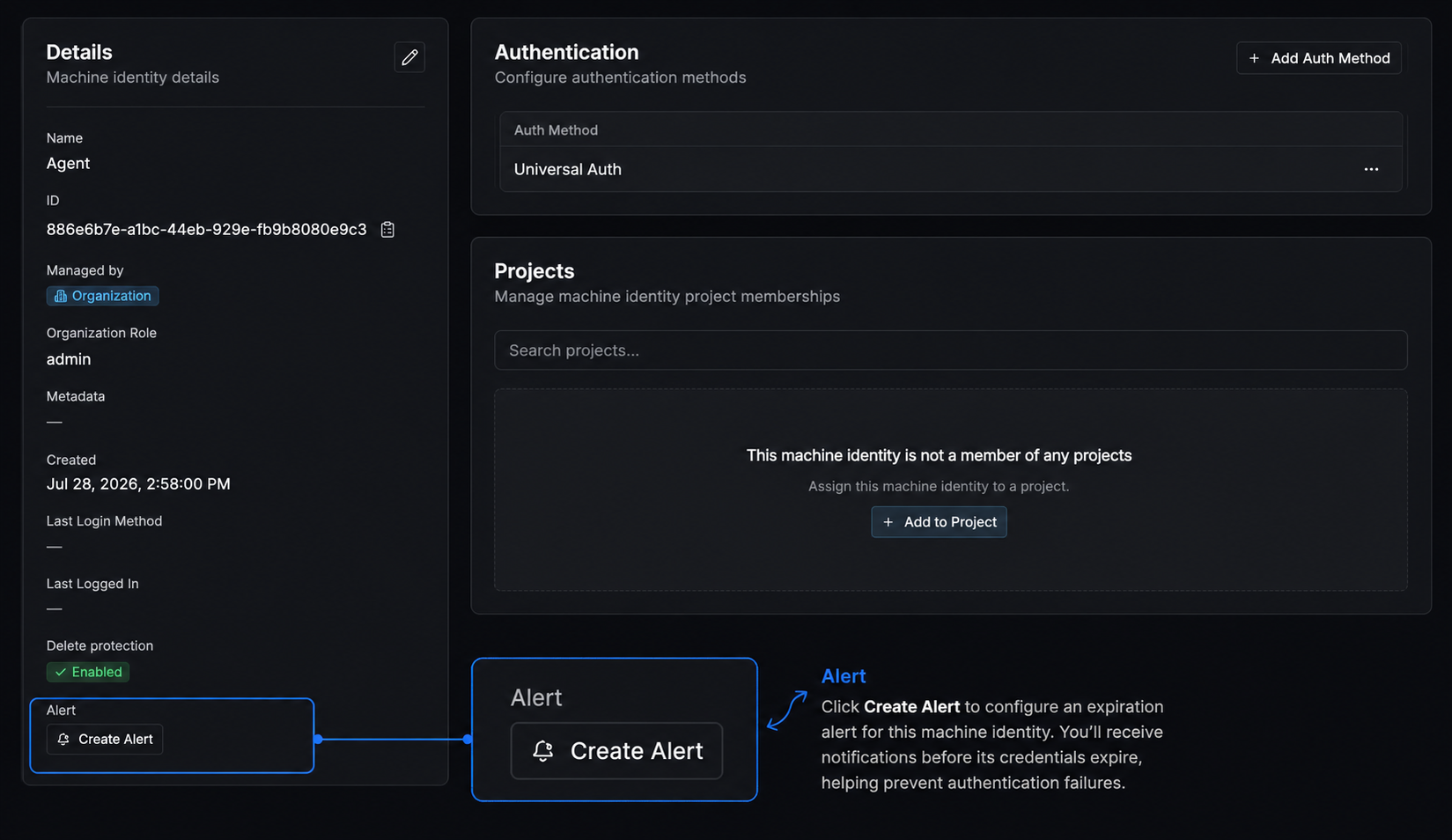
Open the machine identity you want to monitor and find the **Alert** row in its details. Click the bell icon to create one.
Key Features:
* Role Assignment: Identities must be assigned [roles](/docs/documentation/platform/access-controls/role-based-access-controls). These roles determine the scope of access to resources, either at the organization level or project level.
* Auth/Token Configuration: Identities must be configured with corresponding authentication methods and access token properties to securely interact with the Infisical API.
* Expiry Alerting: Identities with expiring credentials can notify your team ahead of time via [Credential Expiry Alerts](#credential-expiry-alerts).
## Scopes
Identities can be created either at the organization-level or the project-level. Outside of identity management and scope of operation, organization and project identities are functionally identical.
* Project identities are managed at the project-level and can only operate within their respective project.
Project-level identities are useful for organizations that delegate responsibility to autonomous teams via projects.
* Organization identities are managed at the organization-level and can be assigned to one or more projects, as well as
perform organization-level operations. Organization-level identities are useful for organizations that have cross-project operations.
## Workflow
A typical workflow for using project identities consists of three steps:
1. Creating the identity with a name and [role](/docs/documentation/platform/access-controls/role-based-access-controls) in Project > Access Control > Machine Identities.
This step also involves configuring an authentication method for it.
2. Authenticating the identity with the Infisical API based on the configured authentication method on it and receiving a short-lived access token back.
3. Authenticating subsequent requests with the Infisical API using the short-lived access token.
A typical workflow for using organization identities consists of four steps:
1. Creating the identity with a name and [role](/docs/documentation/platform/access-controls/role-based-access-controls) in Organization > Access Control > Machine Identities.
This step also involves configuring an authentication method for it.
2. Adding the identity to the project(s) you want it to have access to.
3. Authenticating the identity with the Infisical API based on the configured authentication method on it and receiving a short-lived access token back.
4. Authenticating subsequent requests with the Infisical API using the short-lived access token.
## Authentication Methods
To interact with various resources in Infisical, Machine Identities can authenticate with the Infisical API using:
* [Token Auth](/docs/documentation/platform/identities/token-auth): A platform-agnostic, simple authentication method suitable to authenticate with Infisical using a token.
* [Universal Auth](/docs/documentation/platform/identities/universal-auth): A platform-agnostic authentication method suitable to authenticate with Infisical using a Client ID and Client Secret.
* [Kubernetes Auth](/docs/documentation/platform/identities/kubernetes-auth): A Kubernetes-native authentication method for applications (e.g. pods).
* [AWS Auth](/docs/documentation/platform/identities/aws-auth): An AWS-native authentication method for AWS services (e.g. EC2, Lambda functions, etc.).
* [Azure Auth](/docs/documentation/platform/identities/azure-auth): An Azure-native authentication method for Azure resources (e.g. Azure VMs, Azure App Services, Azure Functions, Azure Kubernetes Service, etc.).
* [GCP Auth](/docs/documentation/platform/identities/gcp-auth): A GCP-native authentication method for GCP resources (e.g. Compute Engine, App Engine, Cloud Run, Google Kubernetes Engine, IAM service accounts, etc.).
* [OIDC Auth](/docs/documentation/platform/identities/oidc-auth): A platform-agnostic, JWT-based authentication method for workloads using an OpenID Connect identity provider.
* [SPIFFE Auth](/docs/documentation/platform/identities/spiffe-auth): A SPIFFE-native authentication method for workloads using JWT-SVIDs issued by SPIRE.
## Identity Lockout
Lockout is a feature that prevents brute-force attacks on identity login endpoints. Auth methods that support lockout include: [Universal Auth](/docs/documentation/platform/identities/universal-auth), [LDAP Auth](/docs/documentation/platform/identities/ldap-auth/general).
Supported auth methods have lockout enabled by default. If triggered, lockout temporarily disables the login endpoint for 5 minutes after 3 consecutive failed login attempts within a 30-second window. Lockout can be configured and disabled in the identity auth method settings.
## Access Token Revocation
Machine identity access tokens can be invalidated before their natural expiry. An access token is revoked when you:
* Call the token revoke endpoint for that token (for example, `POST /api/v1/auth/token/revoke` for Universal Auth).
* Delete the identity, which revokes all of its active access tokens.
* Remove the credential the token was issued from, such as deleting a Universal Auth client secret or removing an authentication method from the identity.
Once revoked, the token is rejected on subsequent authenticated requests and can no longer be renewed. The revocation is persisted in Infisical's database, which is the source of truth consulted on every authentication check.
To keep authentication fast under high request volume, Infisical caches the result of each revocation check in Redis for a short period. Under normal operation a revocation takes effect immediately, because revoking a token also invalidates any cached decision for that identity.
In the rare case where this cache invalidation cannot be performed (for example, a transient Redis disruption during the revoke), the database still records the revocation, but Infisical may continue to accept that exact token until its cached result expires, which takes at most 12 minutes. After that, the check is re-evaluated against the database and the token is rejected.
If you need a revocation to take effect with no propagation delay even under those conditions, rotate the underlying credential (delete the Universal Auth client secret) or delete the identity, both of which invalidate the affected tokens regardless of cache state.
## Credential Expiry Alerts
A machine identity whose credential expires unnoticed takes your workload down with it. Expiry alerts watch the credentials attached to an identity and notify your team a configurable number of days before they expire, so the credential gets rotated before anything breaks.
Alerts currently cover **Universal Auth client secrets that have a TTL**. A client secret is only monitored when its TTL is greater than `0`, since one created with the default TTL of `0` never expires and has nothing to alert on. Revoked client secrets are skipped.
The alert watches the **client secret**, not the access tokens minted from it. Access tokens are
short-lived by design and are renewed programmatically. See
[Universal Auth](/docs/documentation/platform/identities/universal-auth) for the difference between
Client Secret TTL, Access Token TTL, and Access Token Max TTL.
### Create an Alert
Open the machine identity you want to monitor and find the **Alert** row in its details. Click the bell icon to create one.
 | Field | Description |
| ------------------ | --------------------------------------------------------------------------------------- |
| **Name** | A name for the alert, e.g. `ua-secret-expiry` |
| **Description** | Optional context about this alert |
| **Condition** | How many days before expiration to notify, as a whole number from `1` to `90` |
| **Daily Reminder** | If enabled, repeats the alert every day from the threshold until the credential expires |
| **Enabled** | Turn the alert off without deleting it |
With **Daily Reminder** off, each credential triggers the alert once. Turn it on for credentials you cannot afford to miss, and you will get one notification per day until the credential expires or is rotated.
### Notification Channels
An alert delivers through one or more channels, up to 10 per alert. Add at least one.
| Channel | Configuration |
| ------------- | ----------------------------------------------------------------------------------------------------------------------------------------------------------------------------------------------------- |
| **Email** | Pick recipients from the organization's users and groups, up to 20 per channel. Group membership is expanded at send time. |
| **Slack** | An [Incoming Webhook](https://api.slack.com/messaging/webhooks) URL. Must be an HTTPS `hooks.slack.com` URL. |
| **PagerDuty** | An [Events API v2](https://developer.pagerduty.com/docs/events-api-v2-overview) integration key (32-character hex string). Triggers one incident per expiring credential, deduplicated by credential. |
| **Webhook** | Any HTTPS endpoint, with an optional signing secret for verification. |
### Webhook Payload
Webhook deliveries are [CloudEvents](https://cloudevents.io/) 1.0 JSON documents with the type `com.infisical.identity.authentication.expiration`. Every credential due for this run is listed in `data.items`:
```json theme={"dark"}
{
"specversion": "1.0",
"type": "com.infisical.identity.authentication.expiration",
"source": "/alerts/1bd09748-1d5b-4642-8034-f4ca88f59996",
"id": "3f2a91c4-7e6b-4d18-9a55-08c1d4e2b7f0",
"time": "2026-08-16T00:00:04.512Z",
"datacontenttype": "application/json",
"subject": "identity.authentication.expiry",
"data": {
"alert": {
"id": "1bd09748-1d5b-4642-8034-f4ca88f59996",
"name": "ua-secret-expiry",
"resourceType": "identity.authentication",
"condition": "7d"
},
"items": [
{
"id": "ua-client-secret:cff39386-bbe5-44eb-aecf-e2445167b497",
"title": "ci-deploy-bot",
"fields": [
{ "label": "Secret Name", "value": "github-actions" },
{ "label": "Secret Type", "value": "Universal Auth Client Secret" },
{ "label": "Expires", "value": "August 23, 2026 at 04:15 PM UTC" }
]
}
],
"metadata": {
"totalItems": 1,
"viewUrl": "https://app.infisical.com/organizations/18b65352-ad1e-43d5-830f-65c72245c3a3/identities/c6002a8c-4571-4660-b169-f891f4734851"
}
}
}
```
When a signing secret is set, Infisical signs the request and sends it in the `x-infisical-signature` header:
```
x-infisical-signature: t=1786924804512,v1=9f8c1d...e3
```
`t` is a Unix timestamp in **milliseconds**, and `v1` is `HMAC-SHA256(".", )` as a hex digest. Recompute it over the raw body rather than a re-serialized copy, then compare against `v1` before trusting the payload and reject stale timestamps.
## FAQ
Yes - Identities can be used with the CLI.
You can learn more about how to do this in the CLI quickstart [here](/docs/cli/usage).
A service token is a project-level authentication method that is being deprecated in favor of identities. The service token method will be removed in the future in accordance with the deprecation notice and timeline stated [here](https://infisical.com/blog/deprecating-api-keys).
Amongst many differences, identities provide broader access over the Infisical API, utilizes the same
permission system as user identities, and come with a significantly larger number of configurable authentication and security features.
If you're looking for a simple authentication method, similar to service tokens, that can be bound onto an identity, we recommend checking out [Token Auth](/docs/documentation/platform/identities/token-auth).
There are a few reasons for why this might happen:
* You have insufficient organization permissions to create, read, update, delete identities.
* The identity you are trying to read, update, or delete is more privileged than yourself.
* The role you are trying to create an identity for or update an identity to is more privileged than yours.
Expiry alerts run once a day, so a credential whose entire lifetime is shorter than the gap between two runs can expire before an alert is ever due. Alerts are meant for credentials with TTLs measured in days.
The new client secret is evaluated on its own TTL, and the old one drops out of the alert once it is revoked or expires. No change to the alert is needed.
| Field | Description |
| ------------------ | --------------------------------------------------------------------------------------- |
| **Name** | A name for the alert, e.g. `ua-secret-expiry` |
| **Description** | Optional context about this alert |
| **Condition** | How many days before expiration to notify, as a whole number from `1` to `90` |
| **Daily Reminder** | If enabled, repeats the alert every day from the threshold until the credential expires |
| **Enabled** | Turn the alert off without deleting it |
With **Daily Reminder** off, each credential triggers the alert once. Turn it on for credentials you cannot afford to miss, and you will get one notification per day until the credential expires or is rotated.
### Notification Channels
An alert delivers through one or more channels, up to 10 per alert. Add at least one.
| Channel | Configuration |
| ------------- | ----------------------------------------------------------------------------------------------------------------------------------------------------------------------------------------------------- |
| **Email** | Pick recipients from the organization's users and groups, up to 20 per channel. Group membership is expanded at send time. |
| **Slack** | An [Incoming Webhook](https://api.slack.com/messaging/webhooks) URL. Must be an HTTPS `hooks.slack.com` URL. |
| **PagerDuty** | An [Events API v2](https://developer.pagerduty.com/docs/events-api-v2-overview) integration key (32-character hex string). Triggers one incident per expiring credential, deduplicated by credential. |
| **Webhook** | Any HTTPS endpoint, with an optional signing secret for verification. |
### Webhook Payload
Webhook deliveries are [CloudEvents](https://cloudevents.io/) 1.0 JSON documents with the type `com.infisical.identity.authentication.expiration`. Every credential due for this run is listed in `data.items`:
```json theme={"dark"}
{
"specversion": "1.0",
"type": "com.infisical.identity.authentication.expiration",
"source": "/alerts/1bd09748-1d5b-4642-8034-f4ca88f59996",
"id": "3f2a91c4-7e6b-4d18-9a55-08c1d4e2b7f0",
"time": "2026-08-16T00:00:04.512Z",
"datacontenttype": "application/json",
"subject": "identity.authentication.expiry",
"data": {
"alert": {
"id": "1bd09748-1d5b-4642-8034-f4ca88f59996",
"name": "ua-secret-expiry",
"resourceType": "identity.authentication",
"condition": "7d"
},
"items": [
{
"id": "ua-client-secret:cff39386-bbe5-44eb-aecf-e2445167b497",
"title": "ci-deploy-bot",
"fields": [
{ "label": "Secret Name", "value": "github-actions" },
{ "label": "Secret Type", "value": "Universal Auth Client Secret" },
{ "label": "Expires", "value": "August 23, 2026 at 04:15 PM UTC" }
]
}
],
"metadata": {
"totalItems": 1,
"viewUrl": "https://app.infisical.com/organizations/18b65352-ad1e-43d5-830f-65c72245c3a3/identities/c6002a8c-4571-4660-b169-f891f4734851"
}
}
}
```
When a signing secret is set, Infisical signs the request and sends it in the `x-infisical-signature` header:
```
x-infisical-signature: t=1786924804512,v1=9f8c1d...e3
```
`t` is a Unix timestamp in **milliseconds**, and `v1` is `HMAC-SHA256(".", )` as a hex digest. Recompute it over the raw body rather than a re-serialized copy, then compare against `v1` before trusting the payload and reject stale timestamps.
## FAQ
Yes - Identities can be used with the CLI.
You can learn more about how to do this in the CLI quickstart [here](/docs/cli/usage).
A service token is a project-level authentication method that is being deprecated in favor of identities. The service token method will be removed in the future in accordance with the deprecation notice and timeline stated [here](https://infisical.com/blog/deprecating-api-keys).
Amongst many differences, identities provide broader access over the Infisical API, utilizes the same
permission system as user identities, and come with a significantly larger number of configurable authentication and security features.
If you're looking for a simple authentication method, similar to service tokens, that can be bound onto an identity, we recommend checking out [Token Auth](/docs/documentation/platform/identities/token-auth).
There are a few reasons for why this might happen:
* You have insufficient organization permissions to create, read, update, delete identities.
* The identity you are trying to read, update, or delete is more privileged than yourself.
* The role you are trying to create an identity for or update an identity to is more privileged than yours.
Expiry alerts run once a day, so a credential whose entire lifetime is shorter than the gap between two runs can expire before an alert is ever due. Alerts are meant for credentials with TTLs measured in days.
The new client secret is evaluated on its own TTL, and the old one drops out of the alert once it is revoked or expires. No change to the alert is needed.