> ## Documentation Index
> Fetch the complete documentation index at: https://infisical.com/docs/llms.txt
> Use this file to discover all available pages before exploring further.
# LDAP Password Rotation
> Learn how to automatically rotate LDAP passwords.
**Rotation Type: [Single-Phase](/documentation/platform/secret-rotation/overview#single-phase-rotation)**
This rotation updates a single credential set in place. Old credentials become invalid immediately upon rotation. This means that clients using the previous credentials will fail to authenticate until they retrieve the new credentials.
This is a limitation of the LDAP provider and cannot be rectified by Infisical.
## Prerequisites
* Create an [LDAP Connection](/integrations/app-connections/ldap) with the **Secret Rotation** requirements
* Ensure your network security policies allow incoming requests from Infisical to this rotation provider, if network restrictions apply.
## Create an LDAP Password Rotation in Infisical
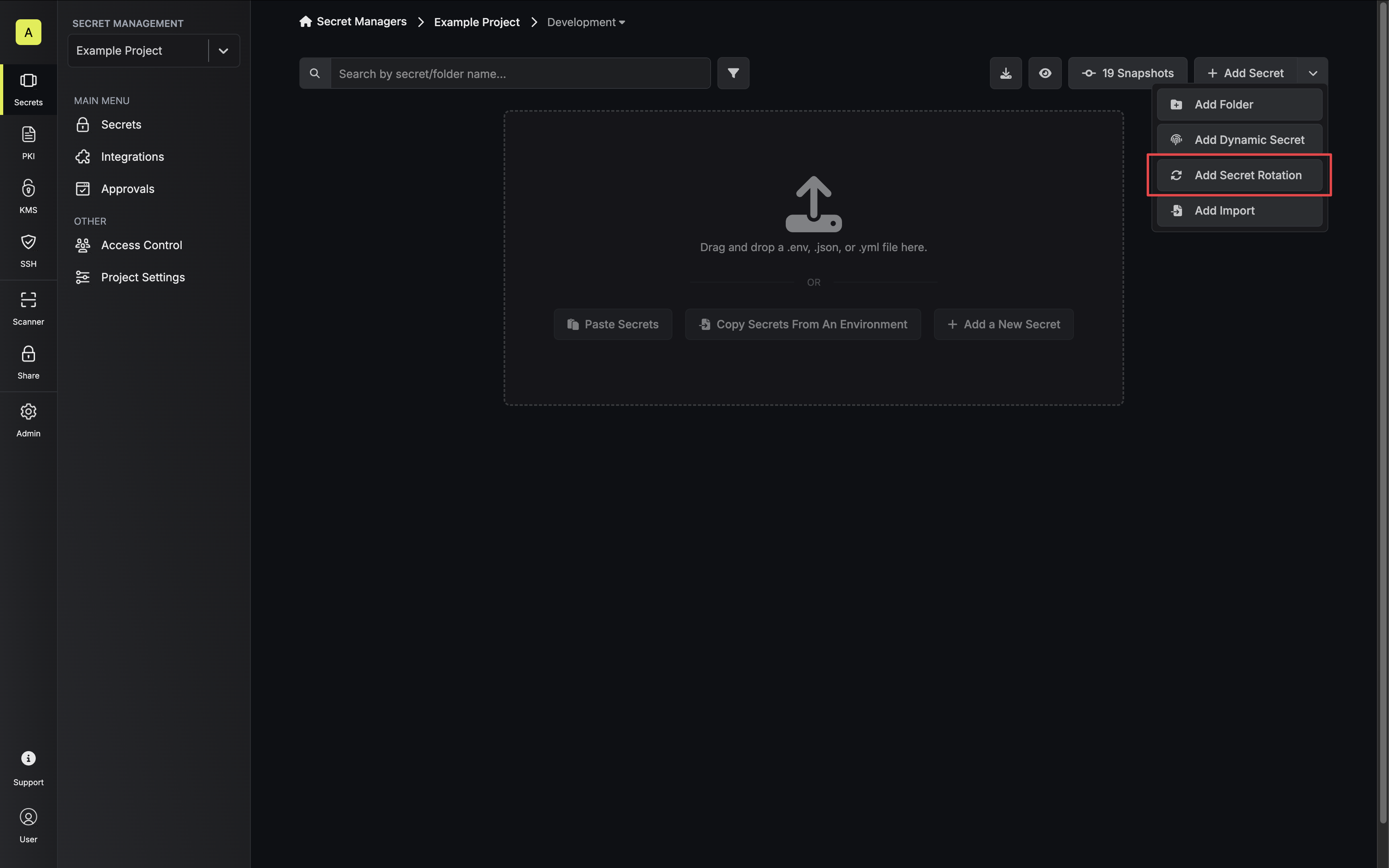
1. Navigate to your Secret Manager Project's Dashboard and select **Add Secret Rotation** from the actions dropdown.
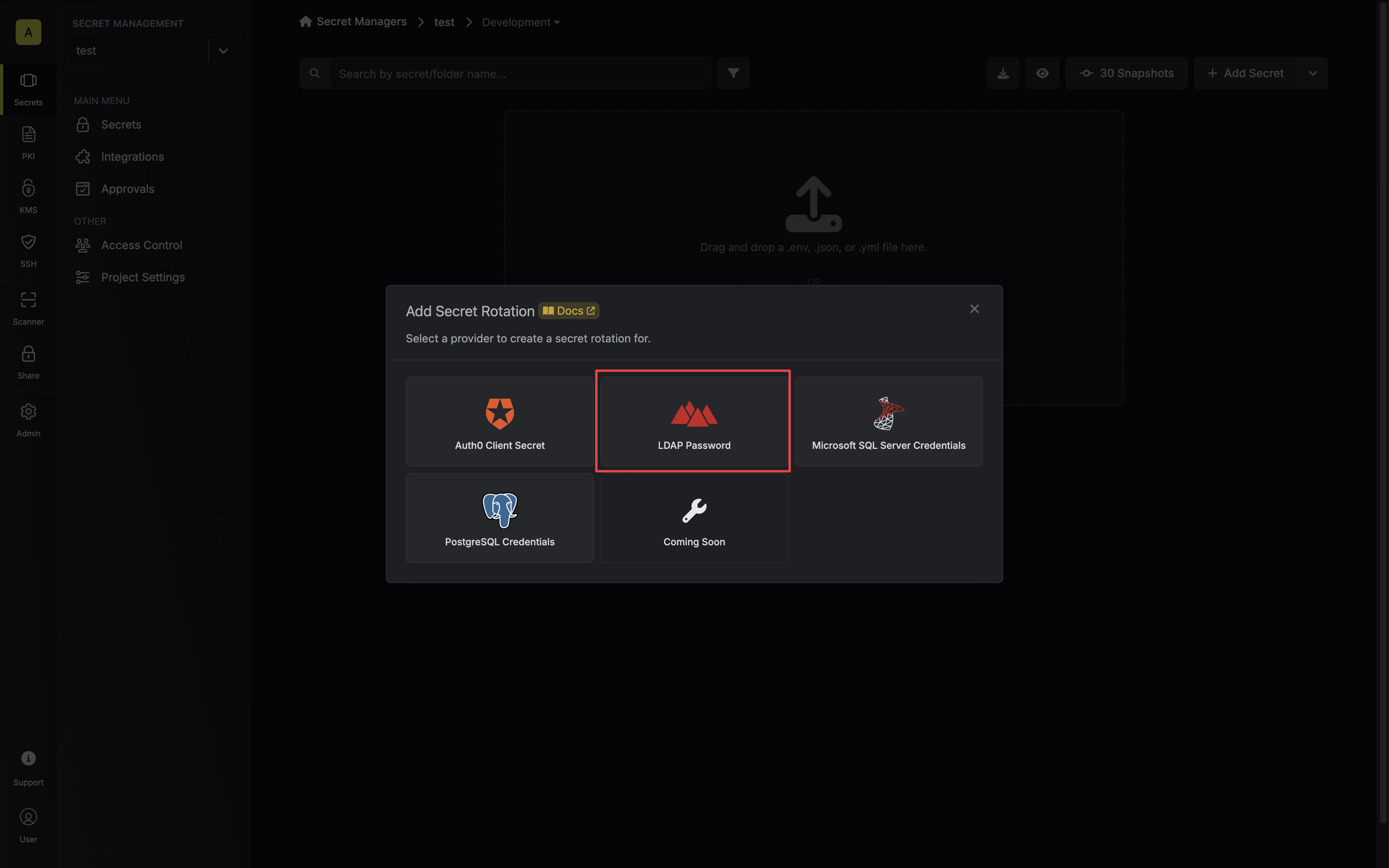
 2. Select the **LDAP Password** option.
 3. Select the **LDAP Connection** to use and configure the rotation behavior. Then click **Next**.
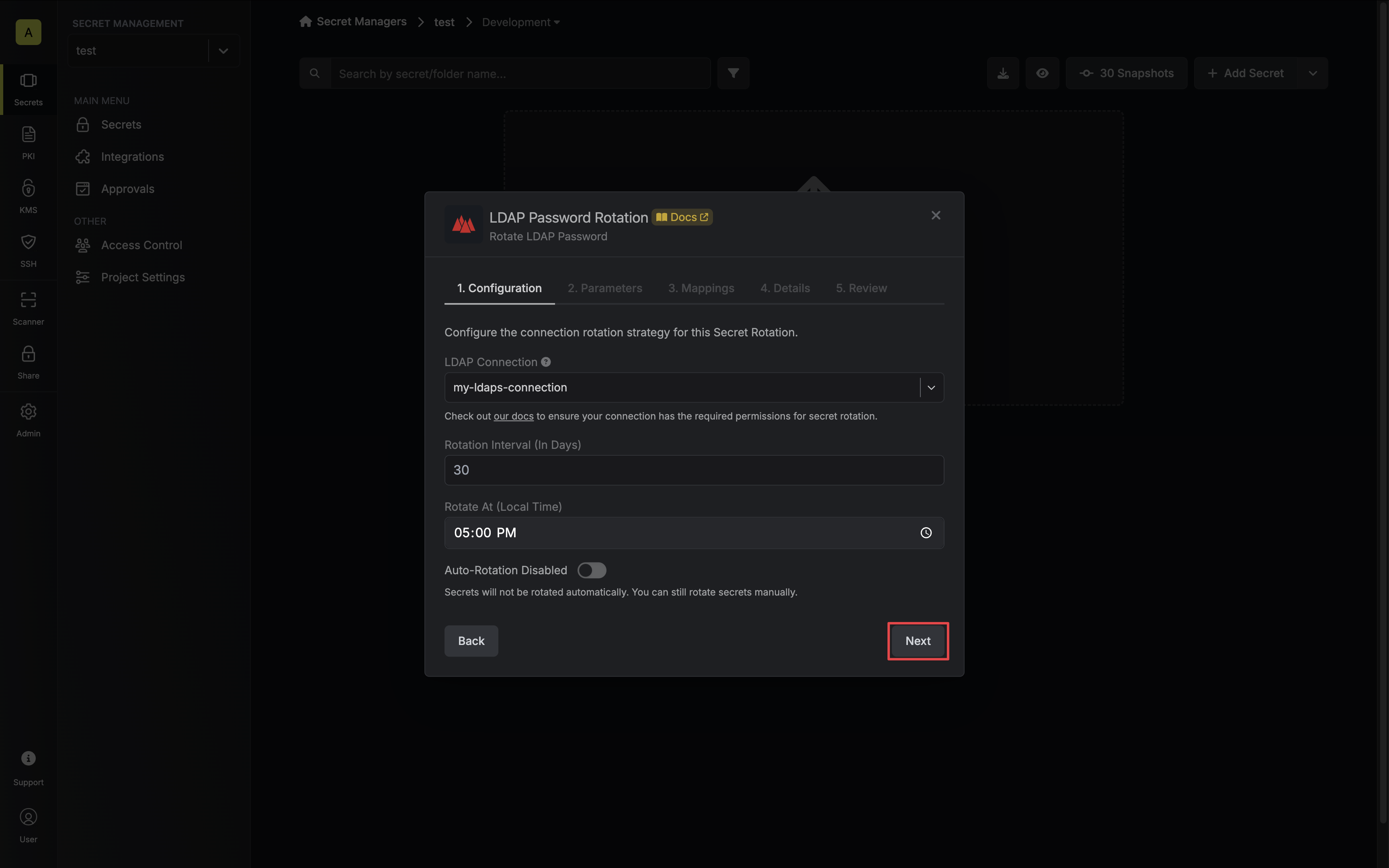 * **LDAP Connection** - the connection that will perform the rotation of the configured principal's password.
LDAP Password Rotations require an LDAP Connection that uses ldaps\:// protocol.
* **Rotation Interval** - the interval, in days, that once elapsed will trigger a rotation.
* **Rotate At** - the local time of day when rotation should occur once the interval has elapsed.
* **Auto-Rotation Enabled** - whether secrets should automatically be rotated once the rotation interval has elapsed. Disable this option to manually rotate secrets or pause secret rotation.
Due to LDAP Password Rotations rotating a single credential set, auto-rotation may result in service interruptions. If you need to ensure service continuity, we recommend disabling this option.
4. Configure the required Parameters for your rotation. Then click **Next**.
* **LDAP Connection** - the connection that will perform the rotation of the configured principal's password.
LDAP Password Rotations require an LDAP Connection that uses ldaps\:// protocol.
* **Rotation Interval** - the interval, in days, that once elapsed will trigger a rotation.
* **Rotate At** - the local time of day when rotation should occur once the interval has elapsed.
* **Auto-Rotation Enabled** - whether secrets should automatically be rotated once the rotation interval has elapsed. Disable this option to manually rotate secrets or pause secret rotation.
Due to LDAP Password Rotations rotating a single credential set, auto-rotation may result in service interruptions. If you need to ensure service continuity, we recommend disabling this option.
4. Configure the required Parameters for your rotation. Then click **Next**.
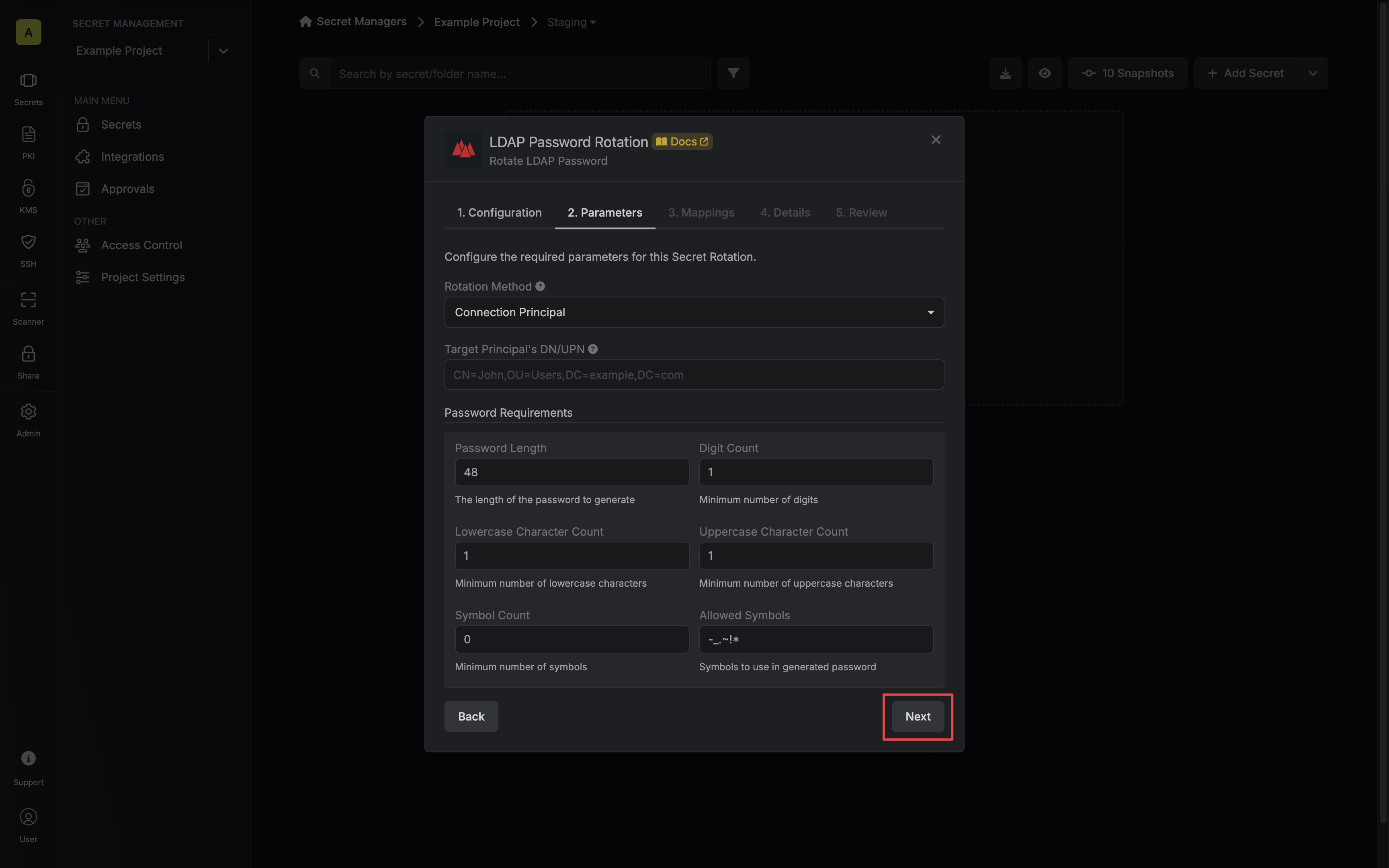 * **Rotation Method** - The method to use when rotating the target principal's password.
* **Connection Principal** - Infisical will use the LDAP Connection's binding principal to rotate the target principal's password.
* **Target Principal** - Infisical will bind with the target Principal to rotate their own password.
* **DN/UPN** - The Distinguished Name (DN), or User Principal Name (UPN) if supported, of the principal whose password you want to rotate.
* **Password** - The target principal's password (if **Rotation Method** is set to **Target Principal**).
* **Password Requirements** - The constraints to apply when generating new passwords.
5. Specify the secret names that the client credentials should be mapped to. Then click **Next**.
* **Rotation Method** - The method to use when rotating the target principal's password.
* **Connection Principal** - Infisical will use the LDAP Connection's binding principal to rotate the target principal's password.
* **Target Principal** - Infisical will bind with the target Principal to rotate their own password.
* **DN/UPN** - The Distinguished Name (DN), or User Principal Name (UPN) if supported, of the principal whose password you want to rotate.
* **Password** - The target principal's password (if **Rotation Method** is set to **Target Principal**).
* **Password Requirements** - The constraints to apply when generating new passwords.
5. Specify the secret names that the client credentials should be mapped to. Then click **Next**.
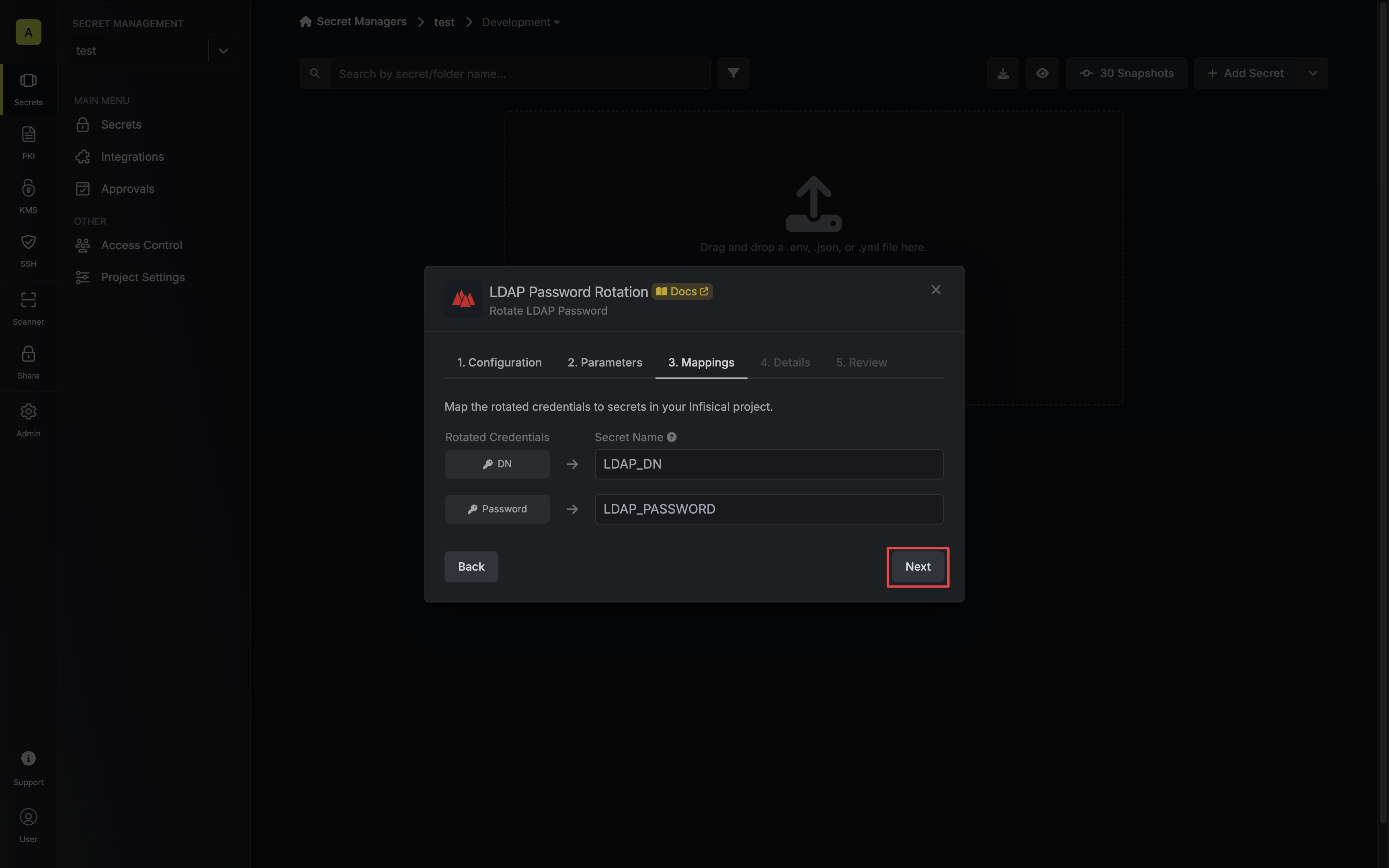 * **DN/UPN** - the name of the secret that the principal's Distinguished Name (DN) or User Principal Name (UPN) will be mapped to.
* **Password** - the name of the secret that the rotated password will be mapped to.
6. Give your rotation a name and description (optional). Then click **Next**.
* **DN/UPN** - the name of the secret that the principal's Distinguished Name (DN) or User Principal Name (UPN) will be mapped to.
* **Password** - the name of the secret that the rotated password will be mapped to.
6. Give your rotation a name and description (optional). Then click **Next**.
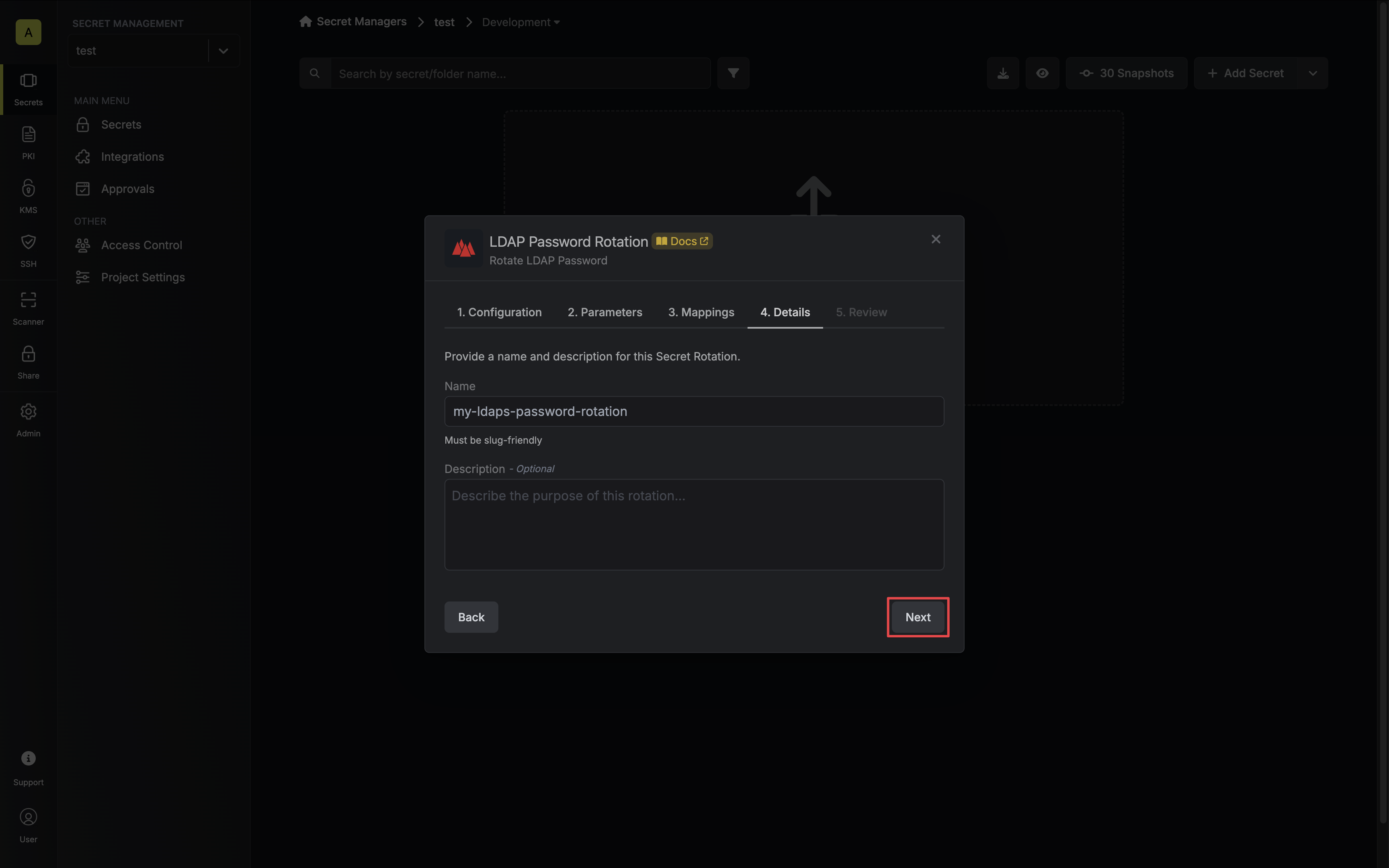 * **Name** - the name of the secret rotation configuration. Must be slug-friendly.
* **Description** (optional) - a description of this rotation configuration.
7. Review your configuration, then click **Create Secret Rotation**.
* **Name** - the name of the secret rotation configuration. Must be slug-friendly.
* **Description** (optional) - a description of this rotation configuration.
7. Review your configuration, then click **Create Secret Rotation**.
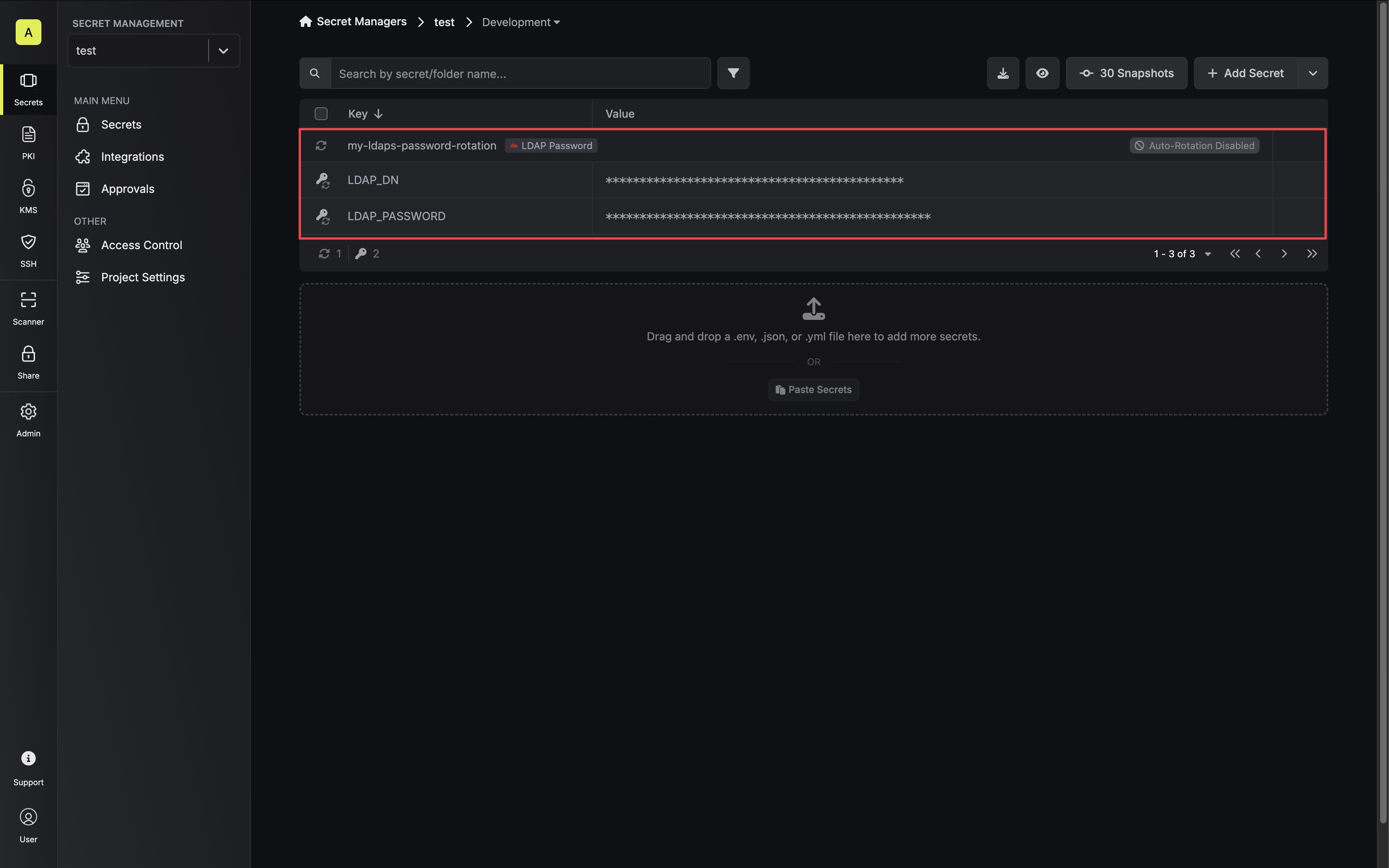
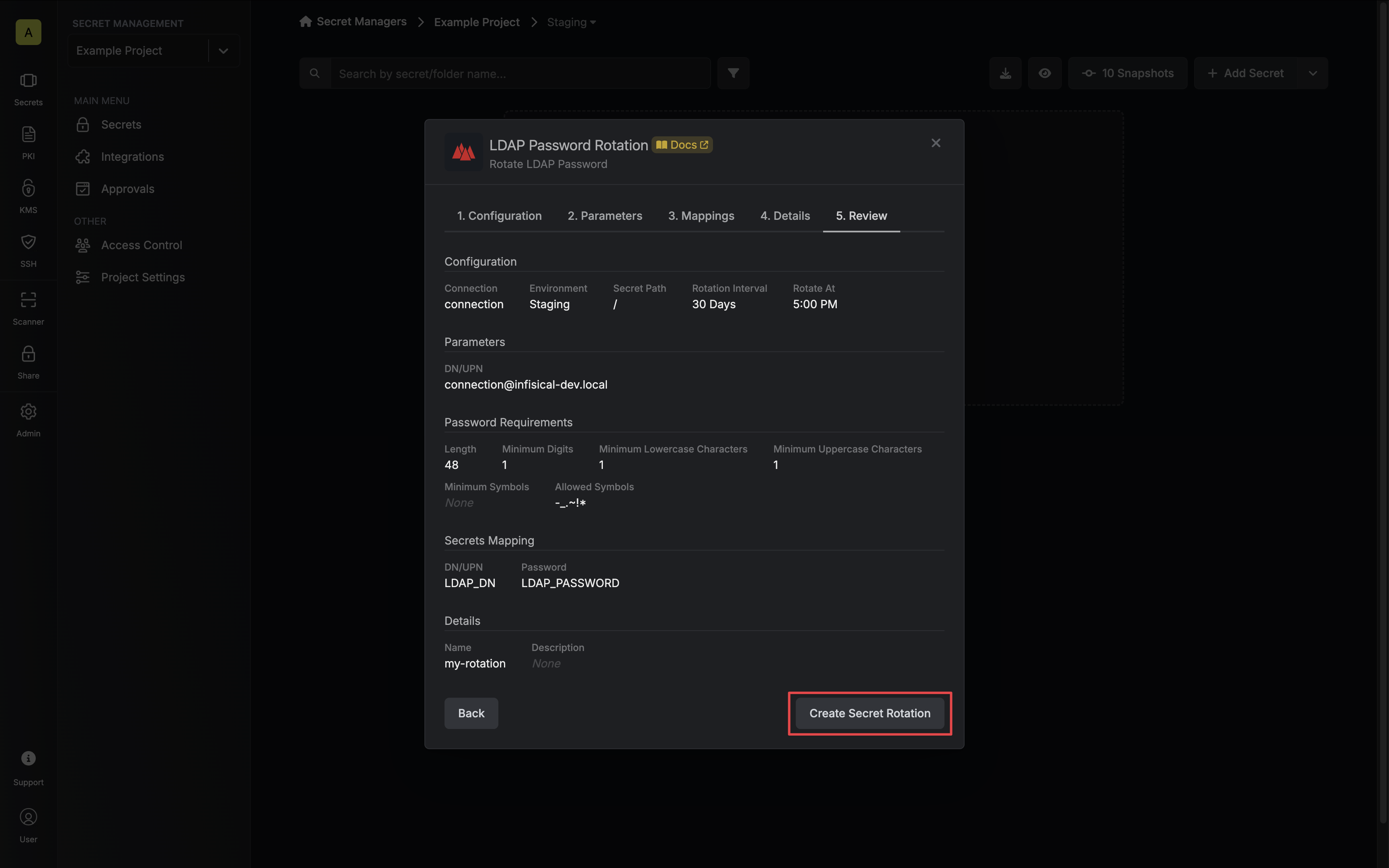 8. Your **LDAP Password** credentials are now available for use via the mapped secrets.
 To create an LDAP Password Rotation, make an API request to the [Create LDAP
Password Rotation](/api-reference/endpoints/secret-rotations/ldap-password/create) API endpoint.
### Sample request
```bash Request theme={"dark"}
curl --request POST \
--url https://us.infisical.com/api/v2/secret-rotations/ldap-password \
--header 'Content-Type: application/json' \
--data '{
"name": "my-ldap-rotation",
"projectId": "3c90c3cc-0d44-4b50-8888-8dd25736052a",
"description": "my ldap password rotation",
"connectionId": "3c90c3cc-0d44-4b50-8888-8dd25736052a",
"environment": "dev",
"secretPath": "/",
"isAutoRotationEnabled": false,
"rotationInterval": 30,
"rotateAtUtc": {
"hours": 0,
"minutes": 0
},
"parameters": {
"rotationMethod": "connection-principal",
"dn": "CN=John,CN=Users,DC=example,DC=com",
"passwordRequirements": {
"length": 48,
"required": {
"digits": 2,
"lowercase": 2,
"uppercase": 2,
"symbols": 2
},
"allowedSymbols": "-_.~!*"
}
},
"secretsMapping": {
"dn": "LDAP_DN",
"password": "LDAP_PASSWORD"
}
}'
```
Due to LDAP Password Rotations rotating a single credential set, auto-rotation may result in service interruptions. If you need to ensure service continuity, we recommend disabling this option.
### Sample response
```bash Response theme={"dark"}
{
"secretRotation": {
"id": "3c90c3cc-0d44-4b50-8888-8dd25736052a",
"name": "my-ldap-rotation",
"description": "my ldap password rotation",
"secretsMapping": {
"dn": "LDAP_DN",
"password": "LDAP_PASSWORD"
},
"isAutoRotationEnabled": false,
"activeIndex": 0,
"folderId": "3c90c3cc-0d44-4b50-8888-8dd25736052a",
"connectionId": "3c90c3cc-0d44-4b50-8888-8dd25736052a",
"createdAt": "2023-11-07T05:31:56Z",
"updatedAt": "2023-11-07T05:31:56Z",
"rotationInterval": 30,
"rotationStatus": "success",
"lastRotationAttemptedAt": "2023-11-07T05:31:56Z",
"lastRotatedAt": "2023-11-07T05:31:56Z",
"lastRotationJobId": "3c90c3cc-0d44-4b50-8888-8dd25736052a",
"nextRotationAt": "2023-11-07T05:31:56Z",
"connection": {
"app": "ldap",
"name": "my-ldap-connection",
"id": "3c90c3cc-0d44-4b50-8888-8dd25736052a"
},
"environment": {
"slug": "dev",
"name": "Development",
"id": "3c90c3cc-0d44-4b50-8888-8dd25736052a"
},
"projectId": "3c90c3cc-0d44-4b50-8888-8dd25736052a",
"folder": {
"id": "3c90c3cc-0d44-4b50-8888-8dd25736052a",
"path": "/"
},
"rotateAtUtc": {
"hours": 0,
"minutes": 0
},
"lastRotationMessage": null,
"type": "ldap-password",
"parameters": {
"rotationMethod": "connection-principal",
"dn": "CN=John,CN=Users,DC=example,DC=com",
"passwordRequirements": {
"length": 48,
"required": {
"digits": 2,
"lowercase": 2,
"uppercase": 2,
"symbols": 2
},
"allowedSymbols": "-_.~!*"
}
}
}
}
```
To create an LDAP Password Rotation, make an API request to the [Create LDAP
Password Rotation](/api-reference/endpoints/secret-rotations/ldap-password/create) API endpoint.
### Sample request
```bash Request theme={"dark"}
curl --request POST \
--url https://us.infisical.com/api/v2/secret-rotations/ldap-password \
--header 'Content-Type: application/json' \
--data '{
"name": "my-ldap-rotation",
"projectId": "3c90c3cc-0d44-4b50-8888-8dd25736052a",
"description": "my ldap password rotation",
"connectionId": "3c90c3cc-0d44-4b50-8888-8dd25736052a",
"environment": "dev",
"secretPath": "/",
"isAutoRotationEnabled": false,
"rotationInterval": 30,
"rotateAtUtc": {
"hours": 0,
"minutes": 0
},
"parameters": {
"rotationMethod": "connection-principal",
"dn": "CN=John,CN=Users,DC=example,DC=com",
"passwordRequirements": {
"length": 48,
"required": {
"digits": 2,
"lowercase": 2,
"uppercase": 2,
"symbols": 2
},
"allowedSymbols": "-_.~!*"
}
},
"secretsMapping": {
"dn": "LDAP_DN",
"password": "LDAP_PASSWORD"
}
}'
```
Due to LDAP Password Rotations rotating a single credential set, auto-rotation may result in service interruptions. If you need to ensure service continuity, we recommend disabling this option.
### Sample response
```bash Response theme={"dark"}
{
"secretRotation": {
"id": "3c90c3cc-0d44-4b50-8888-8dd25736052a",
"name": "my-ldap-rotation",
"description": "my ldap password rotation",
"secretsMapping": {
"dn": "LDAP_DN",
"password": "LDAP_PASSWORD"
},
"isAutoRotationEnabled": false,
"activeIndex": 0,
"folderId": "3c90c3cc-0d44-4b50-8888-8dd25736052a",
"connectionId": "3c90c3cc-0d44-4b50-8888-8dd25736052a",
"createdAt": "2023-11-07T05:31:56Z",
"updatedAt": "2023-11-07T05:31:56Z",
"rotationInterval": 30,
"rotationStatus": "success",
"lastRotationAttemptedAt": "2023-11-07T05:31:56Z",
"lastRotatedAt": "2023-11-07T05:31:56Z",
"lastRotationJobId": "3c90c3cc-0d44-4b50-8888-8dd25736052a",
"nextRotationAt": "2023-11-07T05:31:56Z",
"connection": {
"app": "ldap",
"name": "my-ldap-connection",
"id": "3c90c3cc-0d44-4b50-8888-8dd25736052a"
},
"environment": {
"slug": "dev",
"name": "Development",
"id": "3c90c3cc-0d44-4b50-8888-8dd25736052a"
},
"projectId": "3c90c3cc-0d44-4b50-8888-8dd25736052a",
"folder": {
"id": "3c90c3cc-0d44-4b50-8888-8dd25736052a",
"path": "/"
},
"rotateAtUtc": {
"hours": 0,
"minutes": 0
},
"lastRotationMessage": null,
"type": "ldap-password",
"parameters": {
"rotationMethod": "connection-principal",
"dn": "CN=John,CN=Users,DC=example,DC=com",
"passwordRequirements": {
"length": 48,
"required": {
"digits": 2,
"lowercase": 2,
"uppercase": 2,
"symbols": 2
},
"allowedSymbols": "-_.~!*"
}
}
}
}
```