> ## Documentation Index
> Fetch the complete documentation index at: https://infisical.com/docs/llms.txt
> Use this file to discover all available pages before exploring further.
# LDAP Connection
> Learn how to configure an LDAP Connection for Infisical.
Infisical supports the use of [Simple Binding](https://ldap.com/the-ldap-bind-operation) to connect with your LDAP provider.
## Prerequisites
You will need the following information to establish an LDAP connection:
* **LDAP URL** - The LDAP/LDAPS URL to connect to (e.g., ldap\://domain-or-ip:389 or ldaps\://domain-or-ip:636)
* **Binding DN/UPN** - The Distinguished Name (DN), or User Principal Name (UPN) if supported, of the principal to bind with (e.g., 'CN=John,CN=Users,DC=example,DC=com')
* **Binding Password** - The password to bind with for authentication
* **CA Certificate** - The SSL certificate (PEM format) to use for secure connection when using ldaps\:// with a self-signed certificate
Depending on how you intend to use your LDAP connection, there may be additional requirements:
For Password Rotation, the following requirements must additionally be met:
* You must use an LDAPS connection
* The binding user must either have:
* Permission to change other users passwords if rotating directory users' passwords
* Permission to update their own password if rotating their personal password
## Setup LDAP Connection in Infisical
1. Navigate to the **Integrations** tab in the desired project, then select **App Connections**.
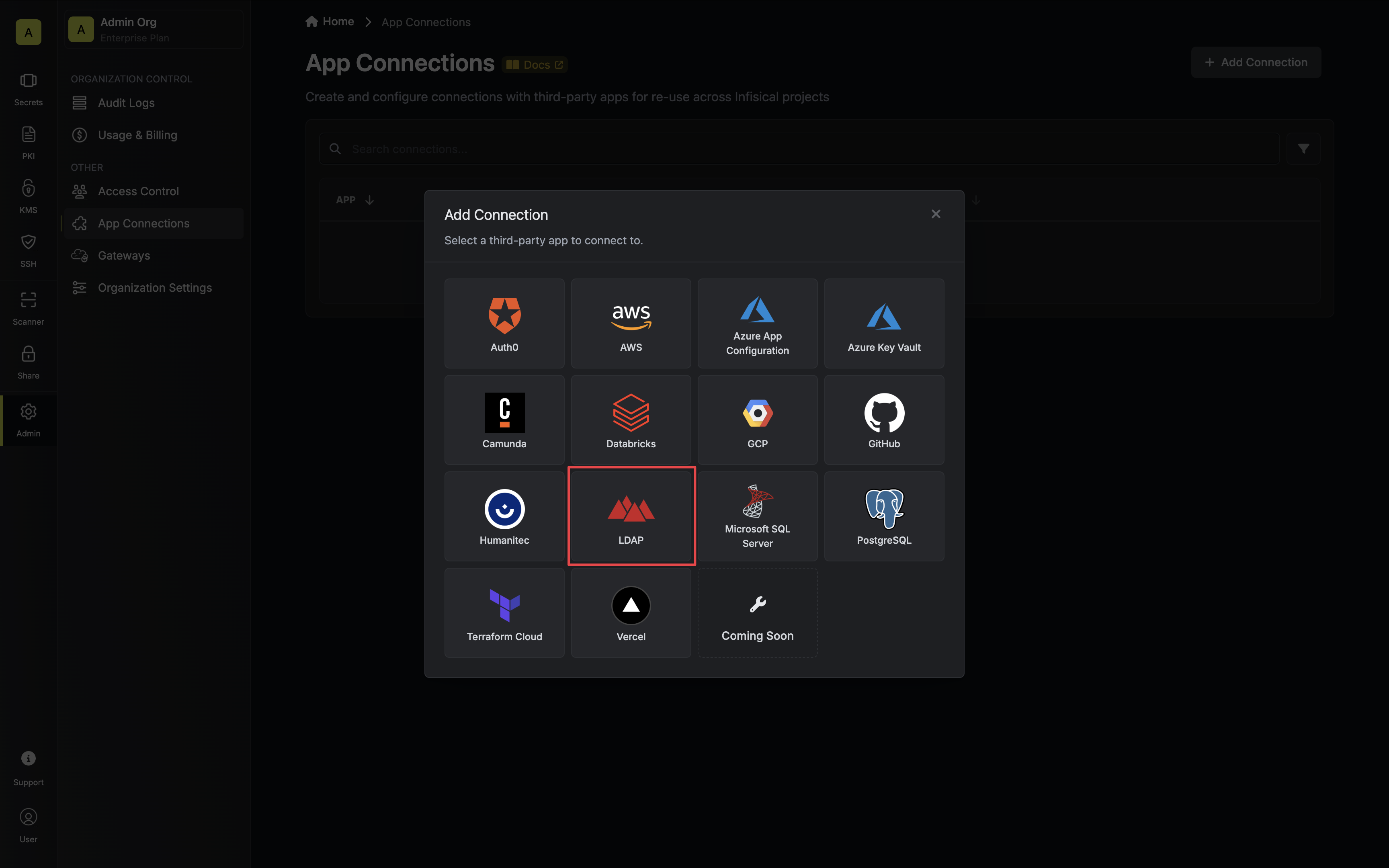
 2. Select the **LDAP Connection** option.
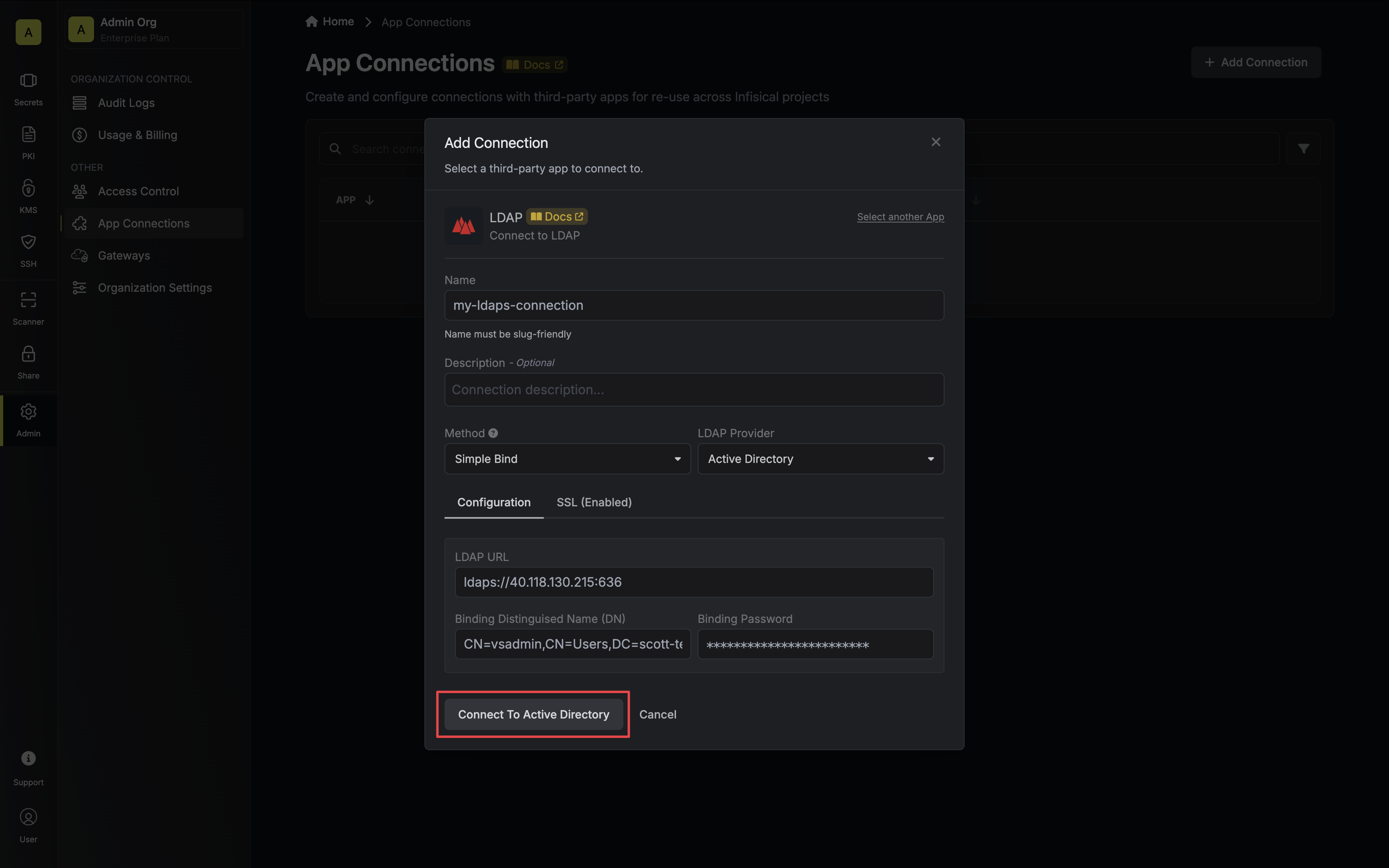
 3. Select the **Simple Bind** method option and provide the details obtained from the previous section and press **Connect to Provider**.
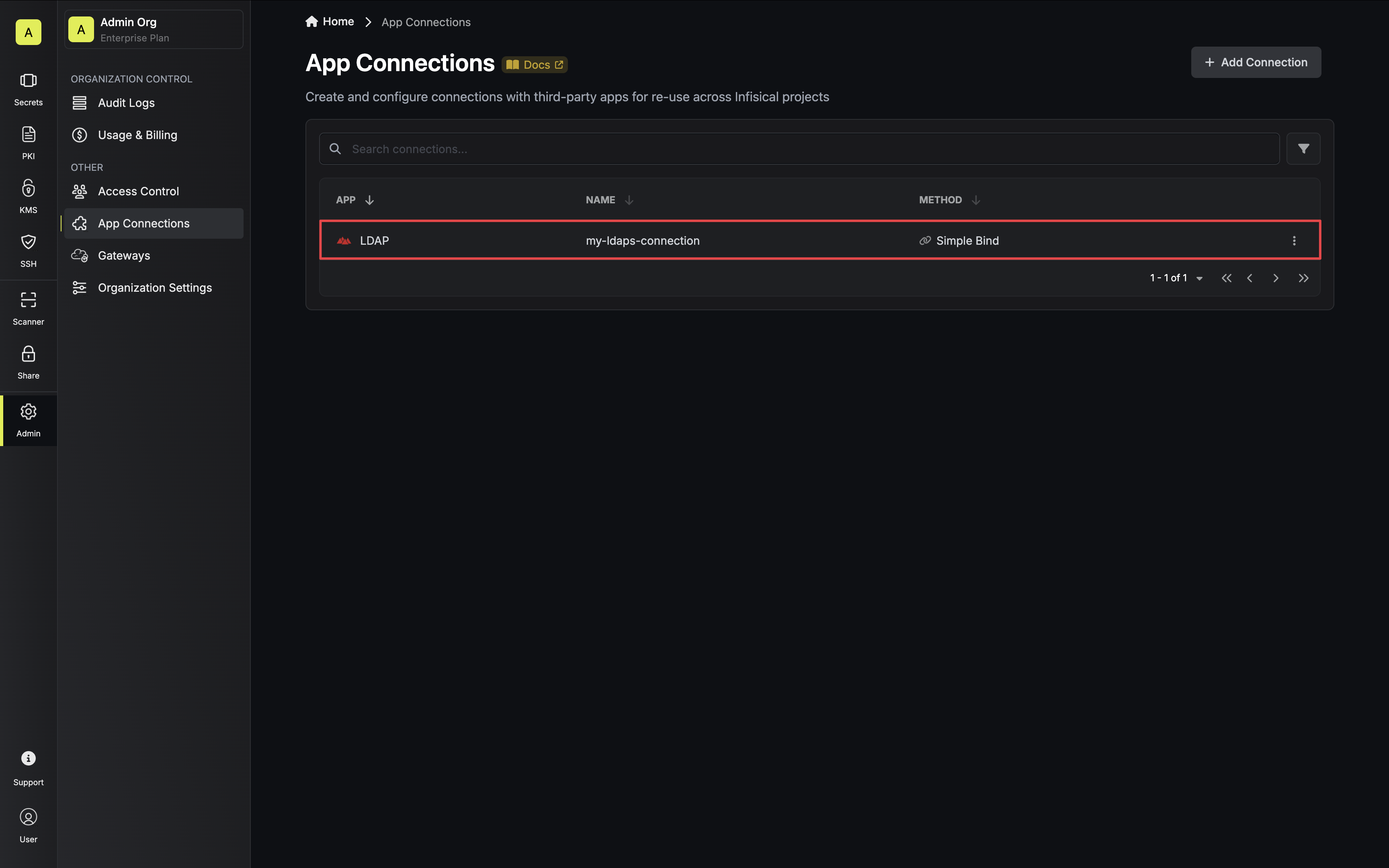
 4. Your **LDAP Connection** is now available for use.
 To create an LDAP Connection, make an API request to the [Create LDAP
Connection](/api-reference/endpoints/app-connections/ldap/create) API endpoint.
### Sample request
```bash Request theme={"dark"}
curl --request POST \
--url https://app.infisical.com/api/v1/app-connections/ldap \
--header 'Content-Type: application/json' \
--data '{
"name": "my-ldap-connection",
"method": "simple-bind",
"projectId": "7ffbb072-2575-495a-b5b0-127f88caef78",
"credentials": {
"provider": "active-directory",
"url": "ldaps://domain-or-ip:636",
"dn": "CN=John,CN=Users,DC=example,DC=com",
"password": "",
"sslRejectUnauthorized": true,
"sslCertificate": "..."
}
}'
```
### Sample response
```bash Response theme={"dark"}
{
"appConnection": {
"id": "3c90c3cc-0d44-4b50-8888-8dd25736052a",
"name": "my-ldap-connection",
"projectId": "7ffbb072-2575-495a-b5b0-127f88caef78",
"version": 1,
"orgId": "3c90c3cc-0d44-4b50-8888-8dd25736052a",
"createdAt": "2023-11-07T05:31:56Z",
"updatedAt": "2023-11-07T05:31:56Z",
"app": "ldap",
"method": "simple-bind",
"credentials": {
"provider": "active-directory",
"url": "ldaps://domain-or-ip:636",
"dn": "CN=John,CN=Users,DC=example,DC=com",
"sslRejectUnauthorized": true,
"sslCertificate": "..."
}
}
}
```
To create an LDAP Connection, make an API request to the [Create LDAP
Connection](/api-reference/endpoints/app-connections/ldap/create) API endpoint.
### Sample request
```bash Request theme={"dark"}
curl --request POST \
--url https://app.infisical.com/api/v1/app-connections/ldap \
--header 'Content-Type: application/json' \
--data '{
"name": "my-ldap-connection",
"method": "simple-bind",
"projectId": "7ffbb072-2575-495a-b5b0-127f88caef78",
"credentials": {
"provider": "active-directory",
"url": "ldaps://domain-or-ip:636",
"dn": "CN=John,CN=Users,DC=example,DC=com",
"password": "",
"sslRejectUnauthorized": true,
"sslCertificate": "..."
}
}'
```
### Sample response
```bash Response theme={"dark"}
{
"appConnection": {
"id": "3c90c3cc-0d44-4b50-8888-8dd25736052a",
"name": "my-ldap-connection",
"projectId": "7ffbb072-2575-495a-b5b0-127f88caef78",
"version": 1,
"orgId": "3c90c3cc-0d44-4b50-8888-8dd25736052a",
"createdAt": "2023-11-07T05:31:56Z",
"updatedAt": "2023-11-07T05:31:56Z",
"app": "ldap",
"method": "simple-bind",
"credentials": {
"provider": "active-directory",
"url": "ldaps://domain-or-ip:636",
"dn": "CN=John,CN=Users,DC=example,DC=com",
"sslRejectUnauthorized": true,
"sslCertificate": "..."
}
}
}
```