> ## Documentation Index
> Fetch the complete documentation index at: https://infisical.com/docs/llms.txt
> Use this file to discover all available pages before exploring further.
# OpenRouter Connection
> Learn how to configure an OpenRouter (LLM router) connection for Infisical.
[OpenRouter](https://openrouter.ai/) is a unified LLM router that gives you access to hundreds of large language models through a single API. Infisical supports connecting to OpenRouter using an **API Key** (Provisioning API key). This connection is used to manage and rotate OpenRouter API keys via [Secret Rotation](/documentation/platform/secret-rotation/openrouter-api-key).
## Prerequisites
You need a **Provisioning API key** from OpenRouter. Provisioning keys are used only for key management (create, list, delete keys)—they cannot be used for model completion requests.
## Create an OpenRouter Provisioning API Key
In [OpenRouter Settings](https://openrouter.ai/settings/provisioning-keys), go to **Provisioning API Keys** and click **Create New Key**.
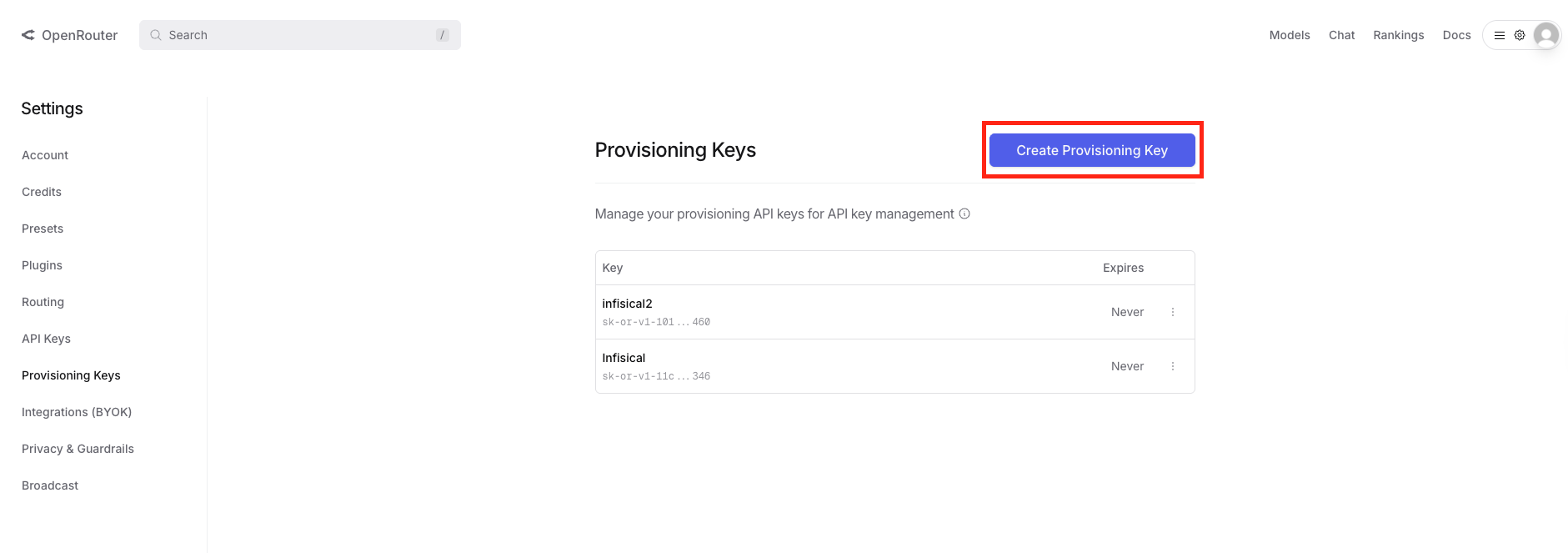 Complete the key creation flow and copy the generated Provisioning API key. Store it securely—you will use it when creating the Infisical connection.
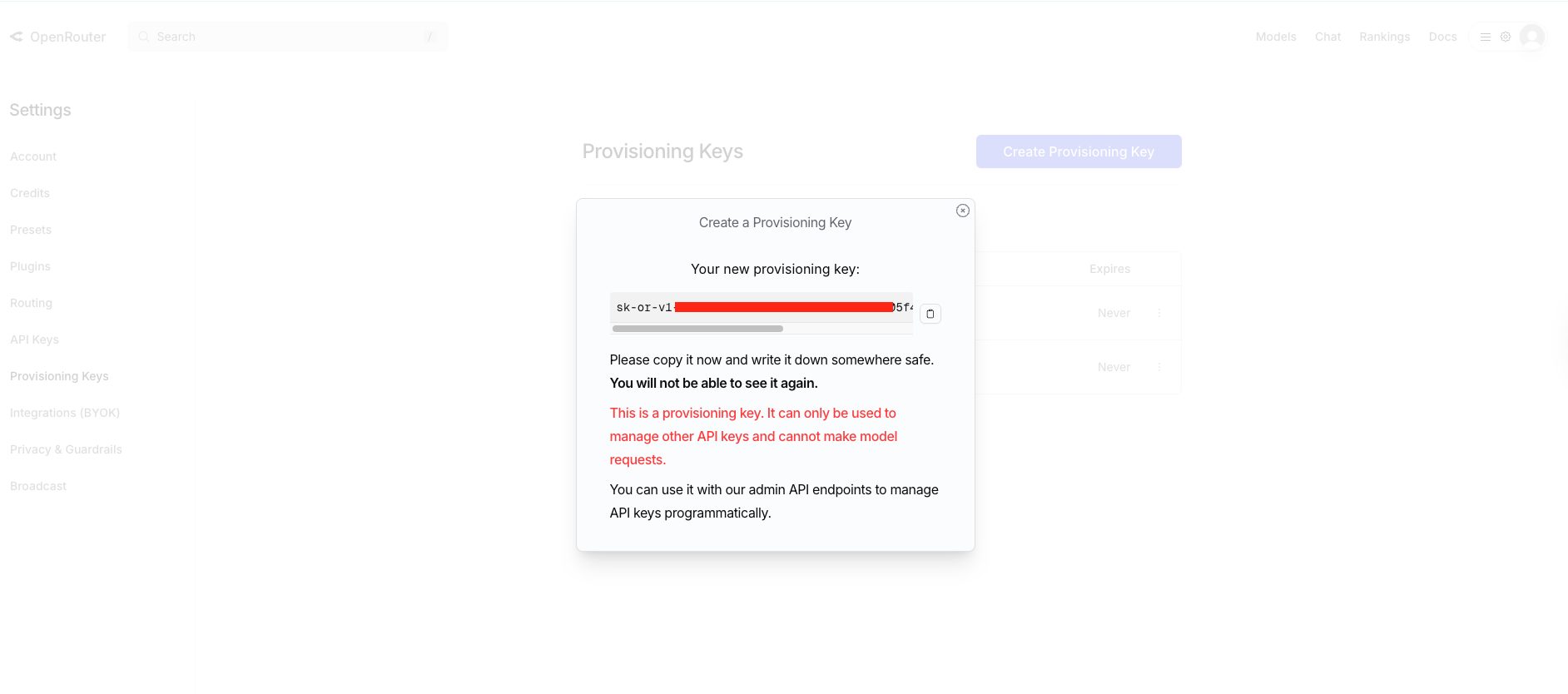 For more details on Provisioning API keys and key management, see [OpenRouter's documentation](https://openrouter.ai/docs/guides/overview/auth/provisioning-api-keys).
## Create OpenRouter Connection in Infisical
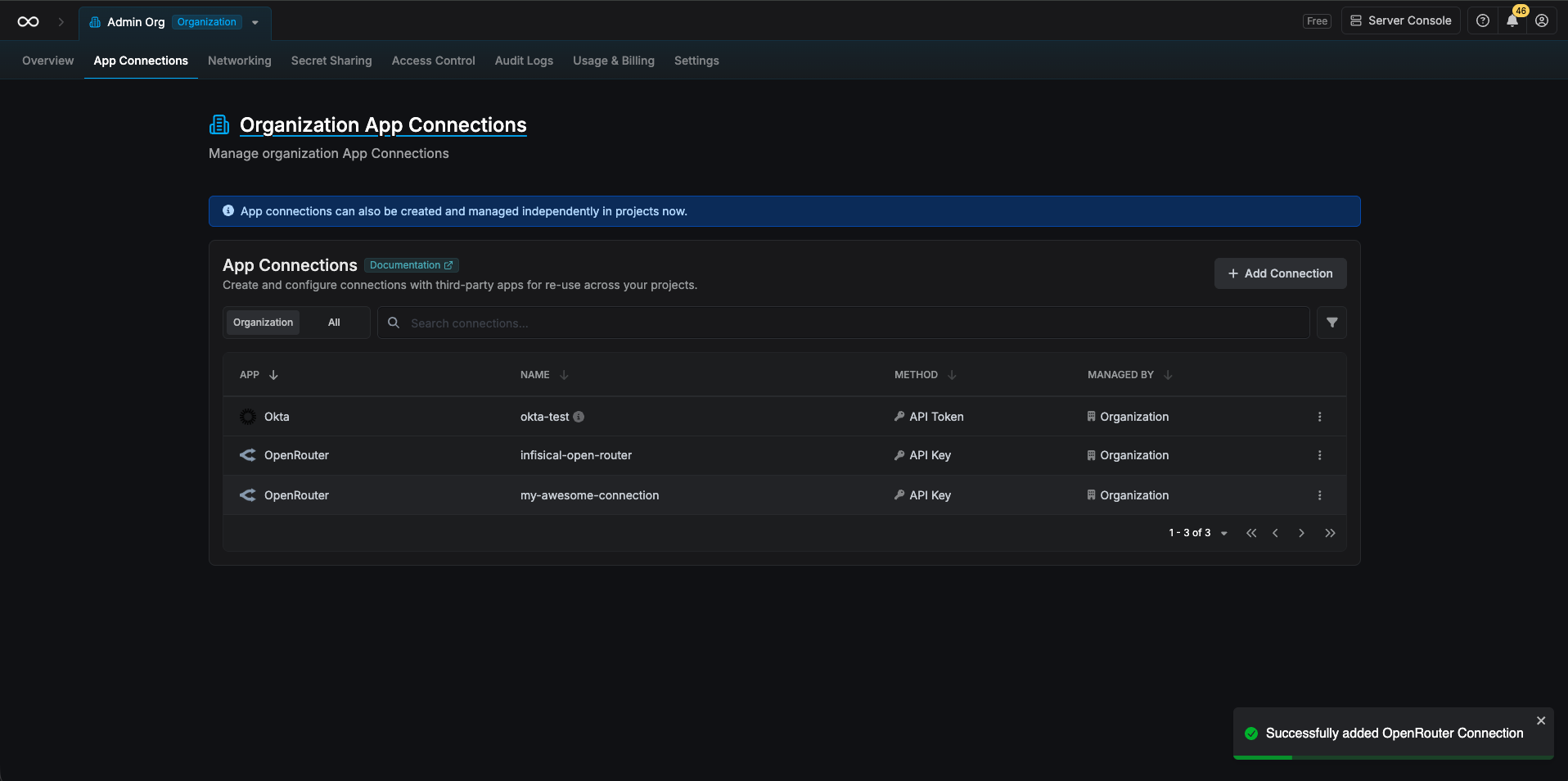
In your Infisical dashboard, go to **Organization Settings** → **App Connections** (or the **Integrations** → **App Connections** tab in your project).
For more details on Provisioning API keys and key management, see [OpenRouter's documentation](https://openrouter.ai/docs/guides/overview/auth/provisioning-api-keys).
## Create OpenRouter Connection in Infisical
In your Infisical dashboard, go to **Organization Settings** → **App Connections** (or the **Integrations** → **App Connections** tab in your project).
 Click **Add Connection** and choose **OpenRouter** from the list of available connections.
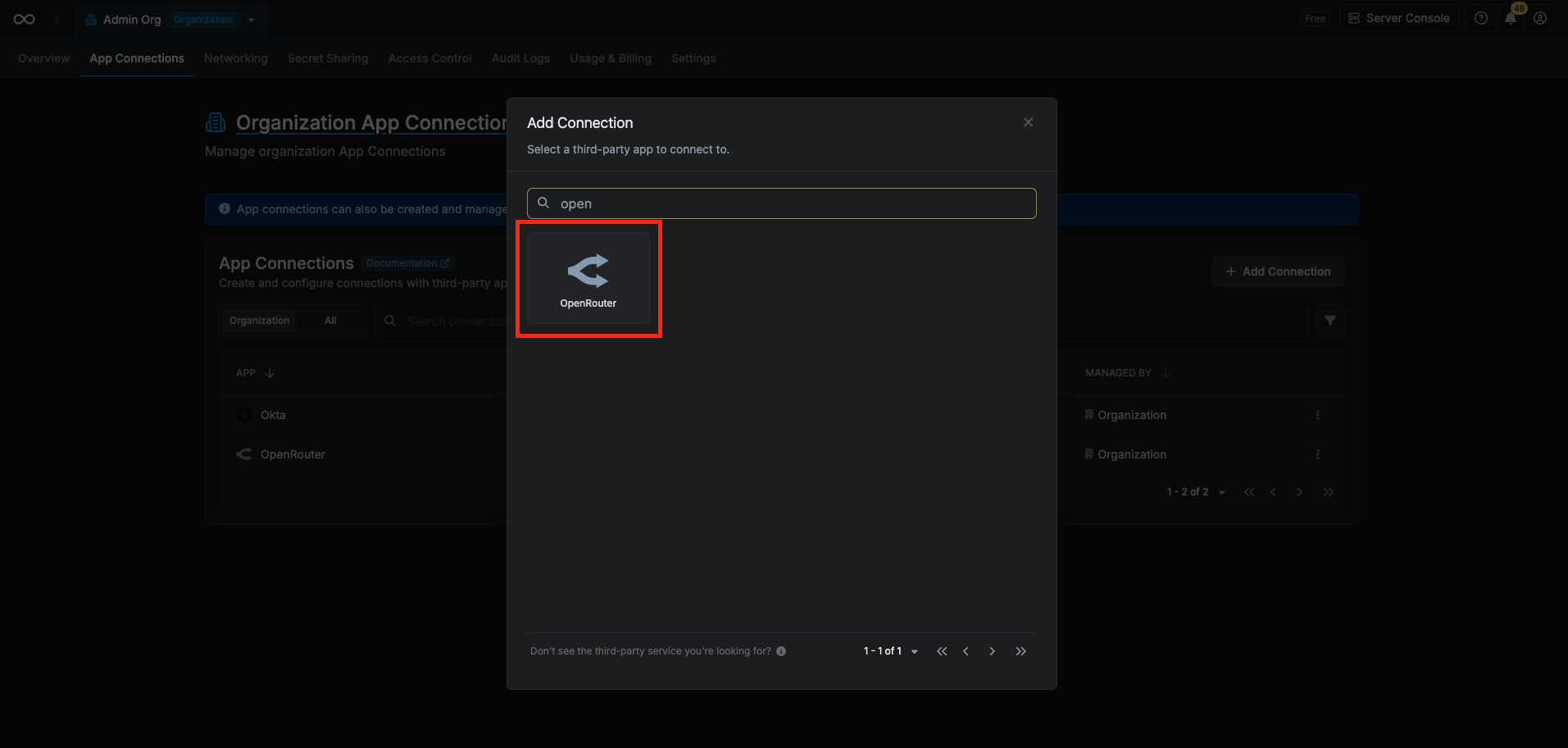 Complete the form with:
* A **name** for the connection (e.g. `openrouter-prod`)
* An optional **description**
* Your **OpenRouter Provisioning API Key** (from the steps above)
Complete the form with:
* A **name** for the connection (e.g. `openrouter-prod`)
* An optional **description**
* Your **OpenRouter Provisioning API Key** (from the steps above)
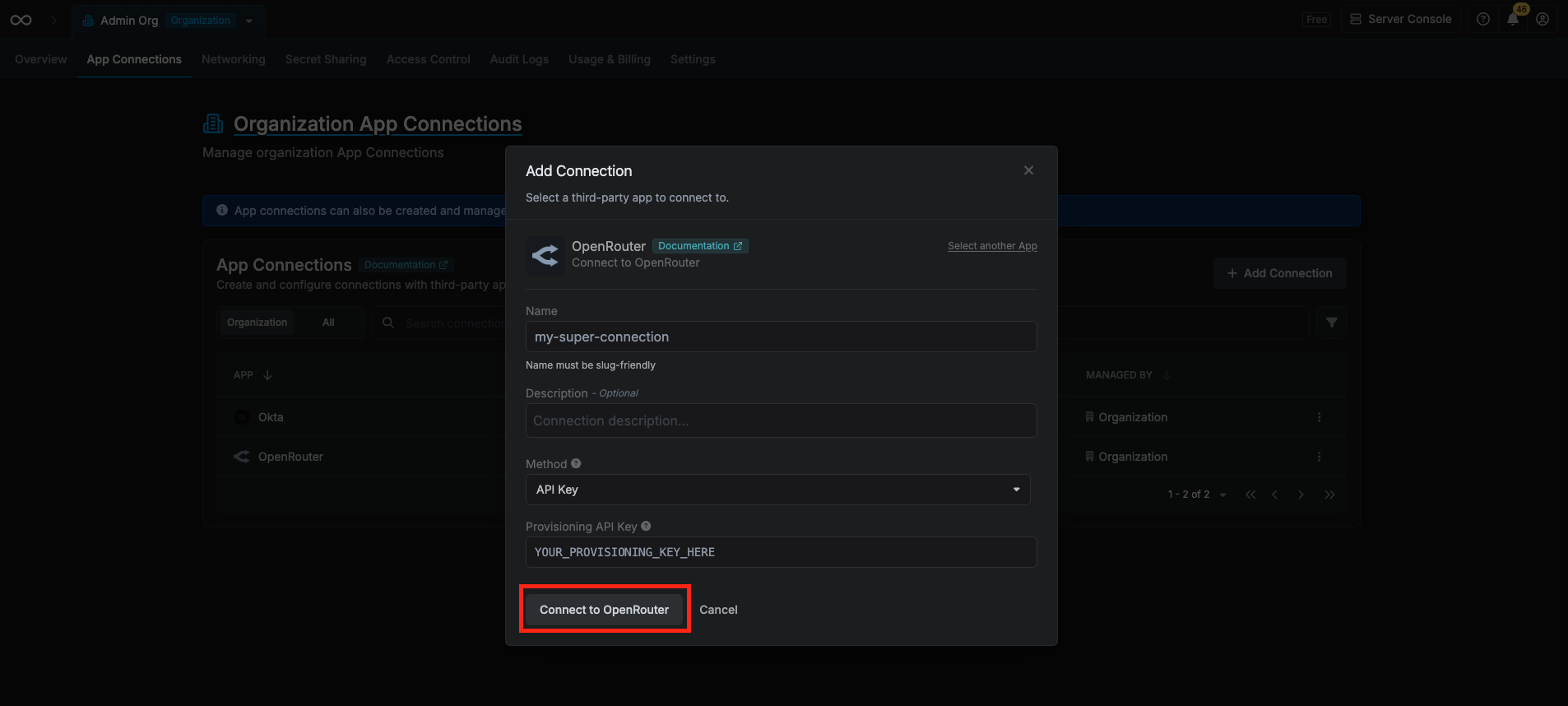 After clicking **Create**, Infisical validates the key against OpenRouter's API. Your **OpenRouter Connection** is then ready to use for [OpenRouter API Key Secret Rotation](/documentation/platform/secret-rotation/openrouter-api-key).
 Create an OpenRouter connection via the [Create OpenRouter Connection](/api-reference/endpoints/app-connections/openrouter/create) API endpoint.
### Sample request
```bash Request theme={"dark"}
curl --request POST \
--url https://app.infisical.com/api/v1/app-connections/open-router \
--header 'Content-Type: application/json' \
--data '{
"name": "my-openrouter-connection",
"method": "api-key",
"projectId": "7ffbb072-2575-495a-b5b0-127f88caef78",
"credentials": {
"apiKey": ""
}
}'
```
### Sample response
```bash Response theme={"dark"}
{
"appConnection": {
"id": "e5d18aca-86f7-4026-a95e-efb8aeb0d8e6",
"name": "my-openrouter-connection",
"projectId": "7ffbb072-2575-495a-b5b0-127f88caef78",
"description": null,
"version": 1,
"orgId": "6f03caa1-a5de-43ce-b127-95a145d3464c",
"createdAt": "2025-04-23T19:46:34.831Z",
"updatedAt": "2025-04-23T19:46:34.831Z",
"isPlatformManagedCredentials": false,
"credentialsHash": "...",
"app": "open-router",
"method": "api-key",
"credentials": {}
}
}
```
Create an OpenRouter connection via the [Create OpenRouter Connection](/api-reference/endpoints/app-connections/openrouter/create) API endpoint.
### Sample request
```bash Request theme={"dark"}
curl --request POST \
--url https://app.infisical.com/api/v1/app-connections/open-router \
--header 'Content-Type: application/json' \
--data '{
"name": "my-openrouter-connection",
"method": "api-key",
"projectId": "7ffbb072-2575-495a-b5b0-127f88caef78",
"credentials": {
"apiKey": ""
}
}'
```
### Sample response
```bash Response theme={"dark"}
{
"appConnection": {
"id": "e5d18aca-86f7-4026-a95e-efb8aeb0d8e6",
"name": "my-openrouter-connection",
"projectId": "7ffbb072-2575-495a-b5b0-127f88caef78",
"description": null,
"version": 1,
"orgId": "6f03caa1-a5de-43ce-b127-95a145d3464c",
"createdAt": "2025-04-23T19:46:34.831Z",
"updatedAt": "2025-04-23T19:46:34.831Z",
"isPlatformManagedCredentials": false,
"credentialsHash": "...",
"app": "open-router",
"method": "api-key",
"credentials": {}
}
}
```