

Prerequisites
- An Agent Vault project where you have the Admin role
- An access bundle in the project, with a service for each API the agent calls (see the quickstart)
- The Infisical CLI installed on the host that will run the Agent Vault proxy and on the host that will run the agent
Run the proxy on a different machine from the agent, on the same private network. If they run on the same machine, the agent can read the proxy token and the private key of the proxy’s certificate authority. If they’re on different networks, every request the agent makes takes longer.We don’t recommend running the agent on your own computer. The agent runs as your user account, so it can read your files and use your Infisical CLI login. Run the agent in a container, a Kubernetes pod, or a sandbox instead.
Step 1: Set up in Infisical
Create a proxy
First, create a proxy to intercept API calls from your agent. Create the proxy in the same project as your access bundle, because a session only works through a proxy in its own project.1
In your Agent Vault project, go to Proxies and select Create Proxy.
2
Give the proxy a Name, then select Create. The Proxy Token dialog shows the proxy token once, with a command to start the proxy. Copy the command from the CLI tab for the next step.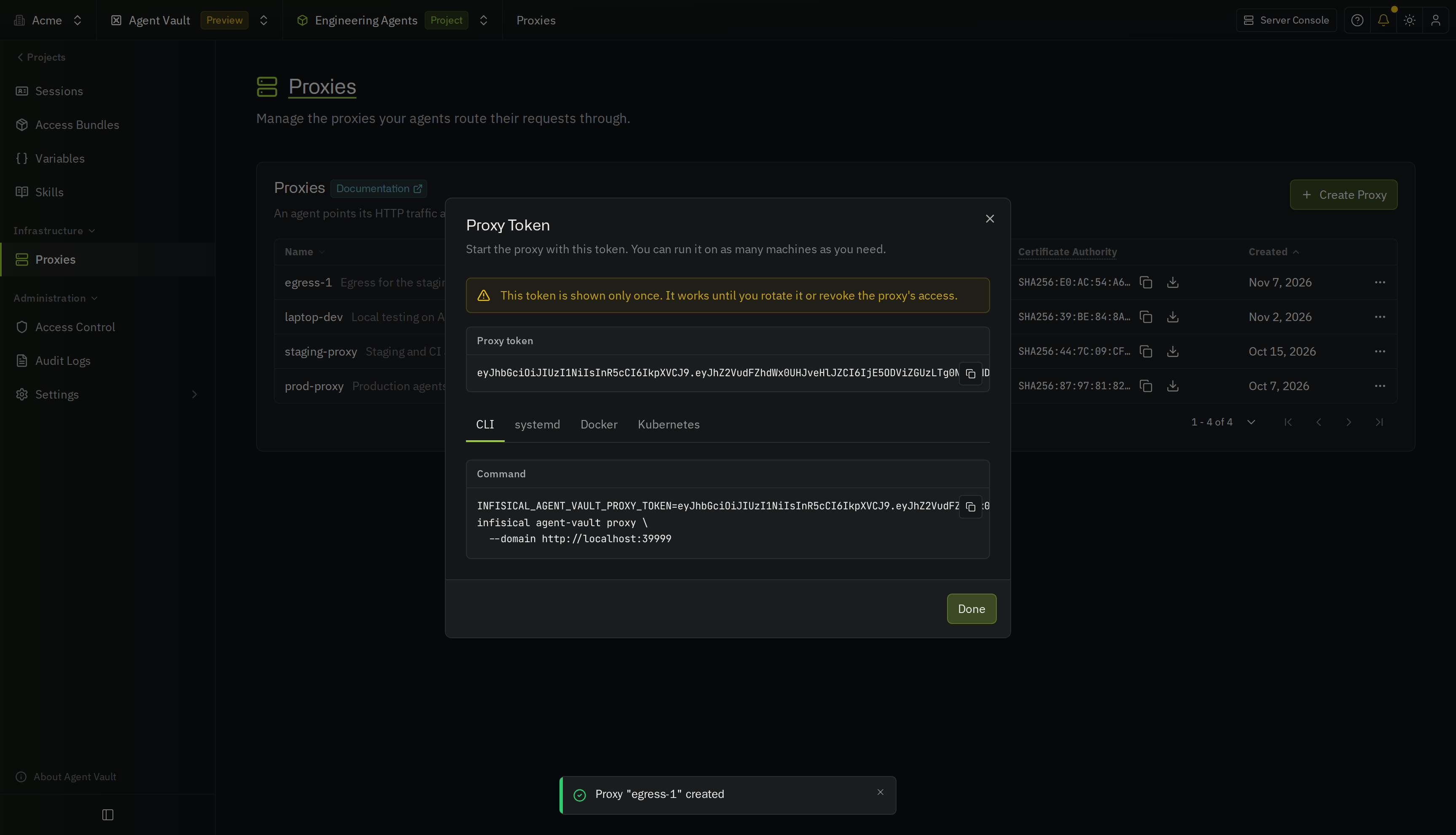
3
On the host that will act as the proxy, run the command from the previous step.The proxy starts listening on port
17323. Leave it running and note this host’s address. You’ll need the address when you launch your agent.This runs the proxy in your current terminal, so the proxy stops when the terminal closes. For a persistent setup, use the Docker command or the Kubernetes manifest from the Proxy Token dialog, or run the proxy with systemd.Check out the proxies documentation for more information.
Create a session
Next, create a session with your access bundle attached.1
In the same project, go to Sessions and select Create Session.
2
Pick the Access Bundle the agent should use, set a duration under Expires, then select Create Session.
3
This creates the session and gives you a command to run your agent with it. Copy the command for the next step.
Step 2: Launch your agent
On the host where the agent runs, paste the command you copied in the previous step. Replace<proxy-host> with your host’s actual domain or IP address, and <agent-command> with your agent’s own command.
The CLI adds the proxy’s certificate authority to the agent process’ trusted CAs and starts the agent with its HTTP traffic routed through the proxy. Any calls to services in your access bundle leave the proxy with the real credential attached, while calls to any other host go out normally.
On macOS, you’ll need to enter your user password when running your agent for the first time. This is because macOS needs your approval to add the proxy’s certificate to your keychain.
Step 3: Verify it works
- With your agent
- With
curl
In your running agent’s session, ask it to make the call. For example:
Troubleshooting
Authentication error from the upstream API
Authentication error from the upstream API
The credential wasn’t applied. Open your access bundle and confirm a service covers the host you called. If one does, the stored token is likely wrong.
407 from the proxy
407 from the proxy
The session token was missing from the request. Confirm you passed
--session-token, or that the token appears as the userinfo in your HTTPS_PROXY URL (like http://x-agent-vault:<session-token>@<proxy-address>).403 from the proxy
403 from the proxy
This could be for a few reasons:
- The session was revoked or has expired (check the Sessions page in Infisical, and create a new one if needed)
- Under the proxy’s strict traffic policy, no service in the bundle covers the host you called (add a service that does, or use a pass-through service)
- The service covers the host, but doesn’t allow the request’s method or path (check the service’s methods and paths)
Next steps
Create sessions with the CLI
Run your agent from cron, a container, or CI, with a new session for each run.
Create sessions with the API
Create sessions from code every time you start your agent.
Skills
Give your agent your team’s instructions each time it starts.